

Errors
Place Outside Page
A place is positioned outside the bounds of its page. Move fixed positions inside the page, or check that placeholders are fully on the page.
What Happened
A place in the document is positioned outside the visible page bounds. Recipients would not be able to interact with it during the ceremony.
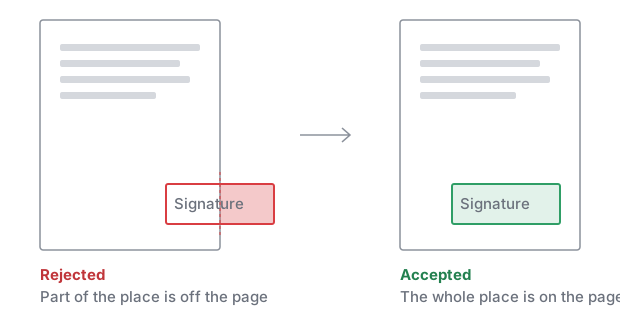
Example response
422 Unprocessable Content (application/problem+json)
{
  "type": "https://signatureapi.com/docs/v1/errors/place-outside-page",
  "title": "Place Out Of Page Bounds",
  "status": 422,
  "detail": "documents[0] has a place with key client_signs_here in page 3 outside the page bounds."
}
How to Fix
- If you are using fixed positions, check
topandleft. They locate the bottom-left corner of the place, in points from the top and left edges of the page. The place must fit on the page:leftplus the place’s width must not pass the right edge,topmust not pass the bottom edge, andtopmust be at least the place’s height. - If you are using placeholders, ensure the placeholder text is fully visible on the page and not cut off by margins or page breaks.
- Check the
detailproperty in the error response, which identifies the specific place that is out of bounds.
Still stuck? Contact support.