
Skip to content

Overview

Quickstart

Send your first document for signature with SignatureAPI: create a test envelope with curl, sign it as the recipient, and download the signed PDF.

Introduction

In this quickstart, we’ll walk you through sending a sample service agreement to Jane Doe (at jane.doe​@​example.com) for her signature.

Get your API key

To get started, sign up for a free test API key. This test API key allows you to create test envelopes without any legal effect and at no cost.

Copy your test API key (it starts with key_test_) and store it in an environment variable named SIGNATUREAPI_KEY in your terminal, so the commands below can read it.

Create your first envelope

An envelope is a container that holds the documents you need to send for signing. Each envelope can include one or more documents and can be sent to one or multiple signers.

In this quickstart, we will create an envelope with one document, one recipient, and a single signing place. We’ll use curl and the command line for this example. Paste this command into your terminal:

Terminal
curl -X POST https://api.signatureapi.com/v1/envelopes \
     -H "X-API-Key: $SIGNATUREAPI_KEY" \
     -H "Content-Type: application/json" \
     -d '{
           "title": "Service Agreement",
           "message": "Please review and sign the Service Agreement.",
           "documents": [
             {
               "url": "https://pub-9cb75390636c4a8a83a6f76da33d7f45.r2.dev/docs-samples/service-agreement.pdf",
               "format": "pdf",
               "places": [
                 {
                   "key": "client_signature",
                   "type": "signature",
                   "recipient_key": "client"
                 }
               ],
               "fixed_positions": [
                 {
                   "place_key": "client_signature",
                   "page": 1,
                   "top": 270,
                   "left": 72
                 }
               ]
             }
           ],
           "recipients": [
             {
               "key": "client",
               "type": "signer",
               "name": "Jane Doe",
               "email": "jane.doe@example.com"
             }
           ]
         }'

This request creates an envelope titled Service Agreement with a message that is included in the emails sent to the recipient.

The envelope has one recipient, identified by the key client. This recipient is a signer named Jane Doe, with the email jane.doe@example.com.

The envelope contains one document, a sample PDF hosted at https://pub-9cb75390636c4a8a83a6f76da33d7f45.r2.dev/docs-samples/service-agreement.pdf.

The document includes a place for the recipient client to sign. The place is of type signature, and fixed_positions puts it on page 1, with its bottom-left corner 270 points from the top and 72 points from the left edge.

Once you’ve sent the request, you should see a 201 Created response like this one. Copy the envelope id from it: you need it later.

{
  "id": "eb4cf433-a8af-4161-b37b-7ef57d423e56",
  "title": "Service Agreement",
  "label": null,
  "message": "Please review and sign the Service Agreement.",
  "status": "processing",
  "mode": "test",
  "routing": "sequential",
  "language": "en",
  "timezone": "UTC",
  "timestamp_format": "MM/DD/YYYY HH:mm:ss",
  "attestation": "none",
  "branding": {
    "logo": null,
    "accent_color": "#2463EB",
    "email": {
      "footer": null,
      "logo_position": "left",
      "from": "noreply@signatureapi.com"
    }
  },
  "sender": {
    "name": "Acme Corp Legal",
    "email": "legal@acme.example",
    "organization": "Acme Corp"
  },
  "topics": [],
  "metadata": {},
  "documents": [
    {
      "id": "doc_4YvlxUZN28CeonDq6rTbvk",
      "envelope_id": "eb4cf433-a8af-4161-b37b-7ef57d423e56",
      "key": "document_0",
      "title": null,
      "page_count": 1,
      "url": "https://pub-9cb75390636c4a8a83a6f76da33d7f45.r2.dev/docs-samples/service-agreement.pdf",
      "format": "pdf",
      "fixed_positions": [
        {
          "place_key": "client_signature",
          "page": 1,
          "top": 270,
          "left": 72
        }
      ],
      "places": [
        {
          "key": "client_signature",
          "type": "signature",
          "recipient_key": "client",
          "height": 60
        }
      ]
    }
  ],
  "recipients": [
    {
      "id": "re_49r1R2jpPDz8hSpP75ZkPp",
      "envelope_id": "eb4cf433-a8af-4161-b37b-7ef57d423e56",
      "type": "signer",
      "key": "client",
      "email": "jane.doe@example.com",
      "name": "Jane Doe",
      "ceremony": {
        "authentication": [
          {
            "type": "email_link",
            "subject_override": null,
            "message_override": null
          }
        ],
        "embeddable_in": [],
        "redirect_url": null,
        "redirect_delay": 3,
        "url": null,
        "url_variant": "standard"
      },
      "ceremony_creation": "automatic",
      "delivery_type": "email",
      "signature_options": [
        "typed",
        "drawn"
      ],
      "status": "pending",
      "status_updated_at": "2026-11-02T14:03:11.000Z",
      "completed_at": null
    }
  ],
  "deliverable": {
    "id": "del_6FF89lKNyTNamOJCJd1tLL",
    "envelope_id": "eb4cf433-a8af-4161-b37b-7ef57d423e56",
    "name": null,
    "status": "pending",
    "type": "standard",
    "url": null,
    "password": null,
    "created_at": "2026-11-02T14:03:11.000Z",
    "generated_at": null,
    "timezone": "UTC",
    "language": "en",
    "timestamp_format": "MM/DD/YYYY HH:mm:ss",
    "included_documents": [
      "document_0"
    ]
  },
  "captures": {},
  "snapshot_url": null,
  "created_at": "2026-11-02T14:03:11.000Z",
  "completed_at": null
}

Errors every call can return are in Errors and Authentication.

The envelope starts in processing and moves to in_progress once SignatureAPI has prepared the document and sent the signing request.

Check the sent email

Although test API keys don’t send real emails, you can view the email that would be sent in the Dashboard.

  1. Log in to your Dashboard.
  2. Navigate to the Envelopes list and select your newly created envelope.
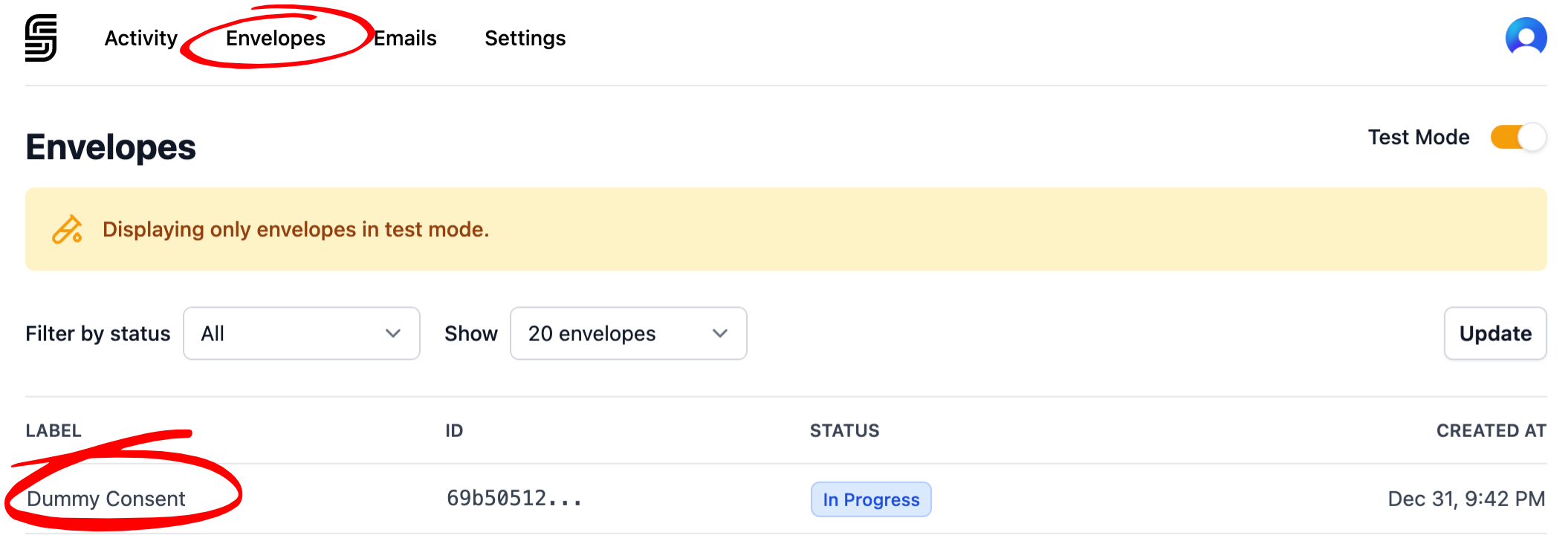
The Envelopes page in test mode, with the Service Agreement envelope listed as In Progress
Envelopes

In the envelope details, scroll down to the Emails section and click on the email sent to Jane Doe.
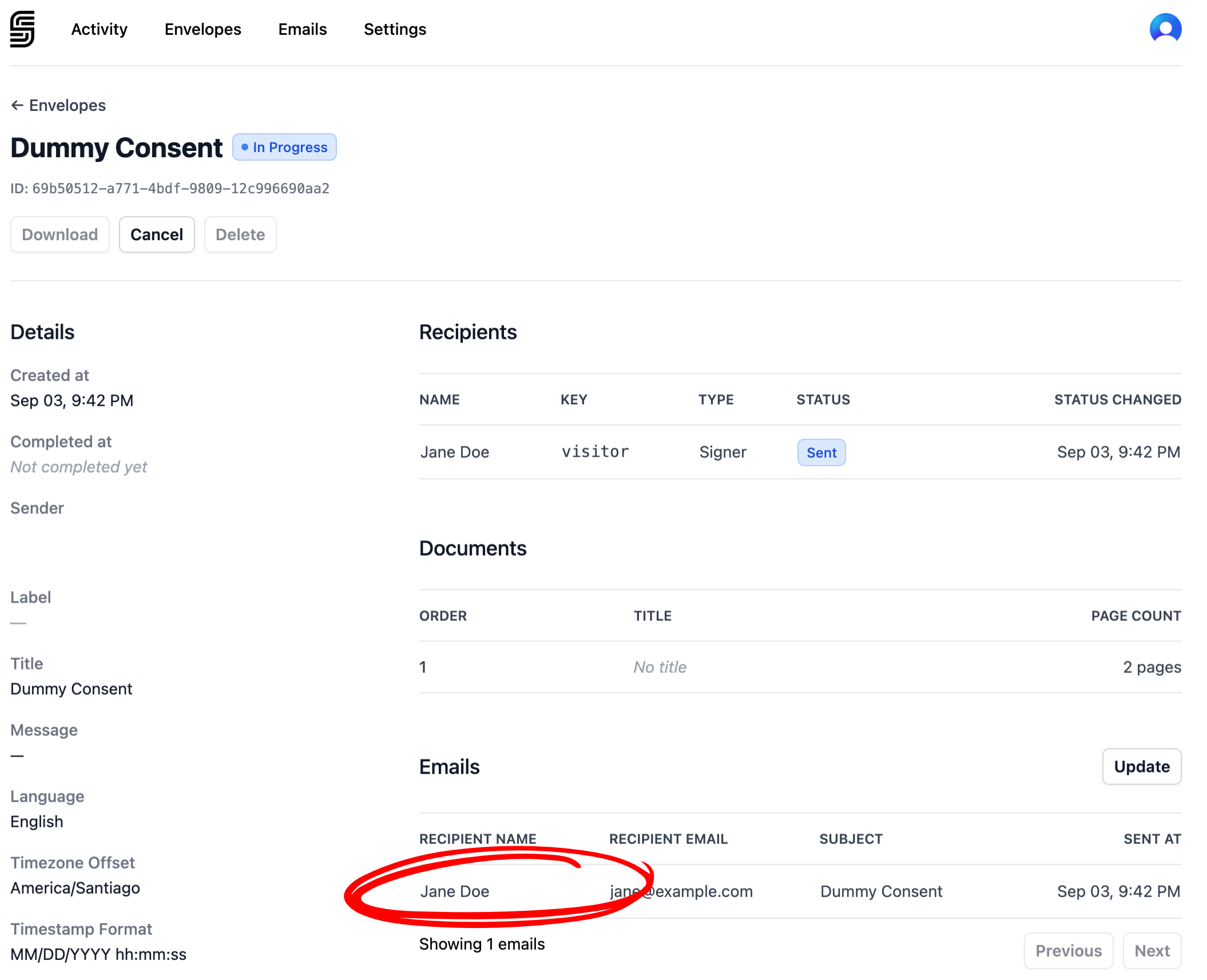
The Service Agreement envelope page with its details, Jane Doe listed under Recipients with status Sent, and her signing request email under Emails
Envelopes > Service Agreement

You’ll be able to preview the email and see how it would appear if it were sent to the recipient. In test mode, however, emails are not actually sent to recipients.
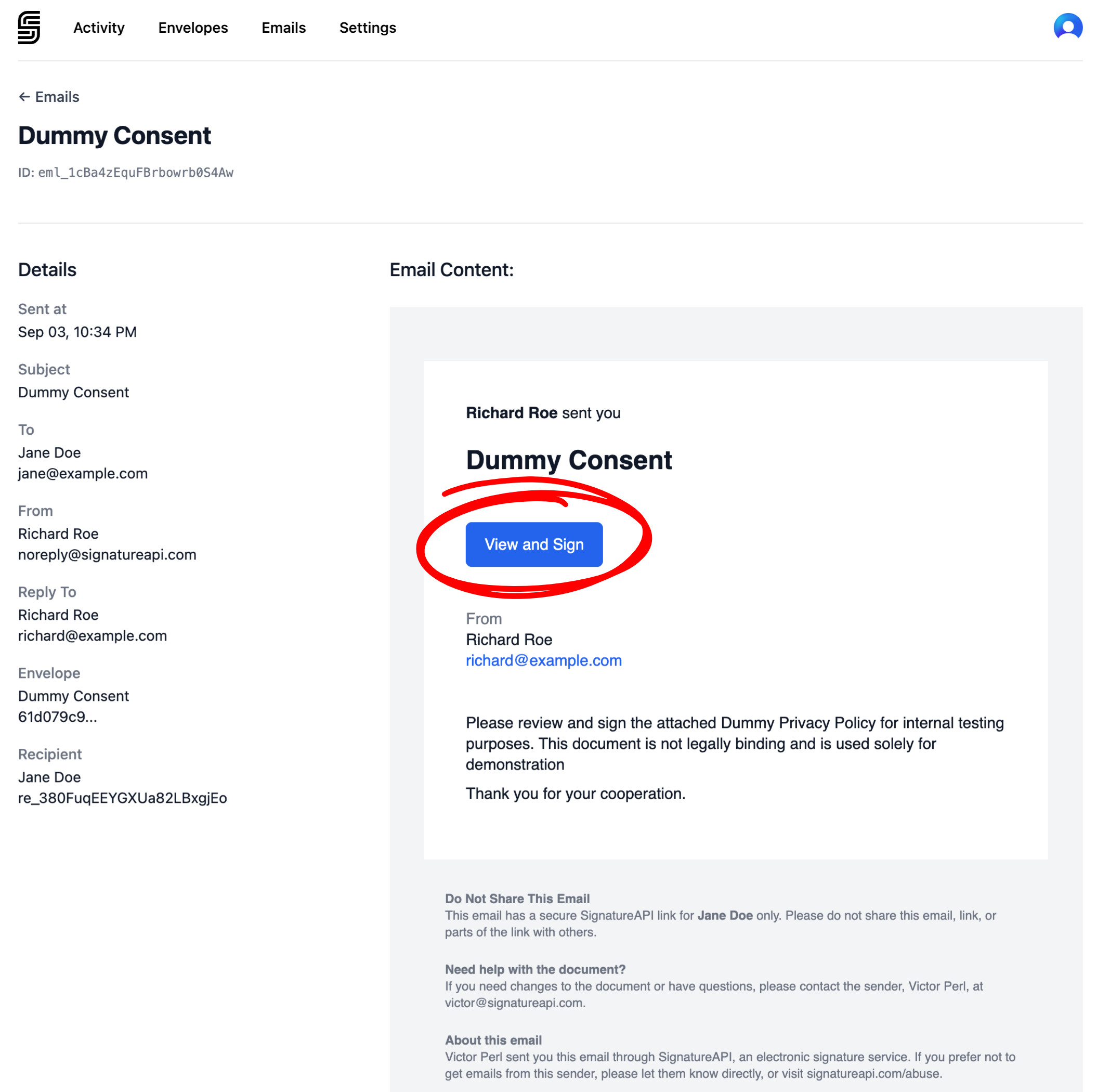
The preview of the signing request email to Jane Doe, with the envelope title Service Agreement and a View and Sign button
Emails > Service Agreement

Click the View and Sign button in the email preview to go to the signing ceremony as Jane.

Sign the envelope as Jane

Now, you’ll step into Jane Doe’s shoes as the signer. Go through the signing ceremony and sign the document as Jane would.
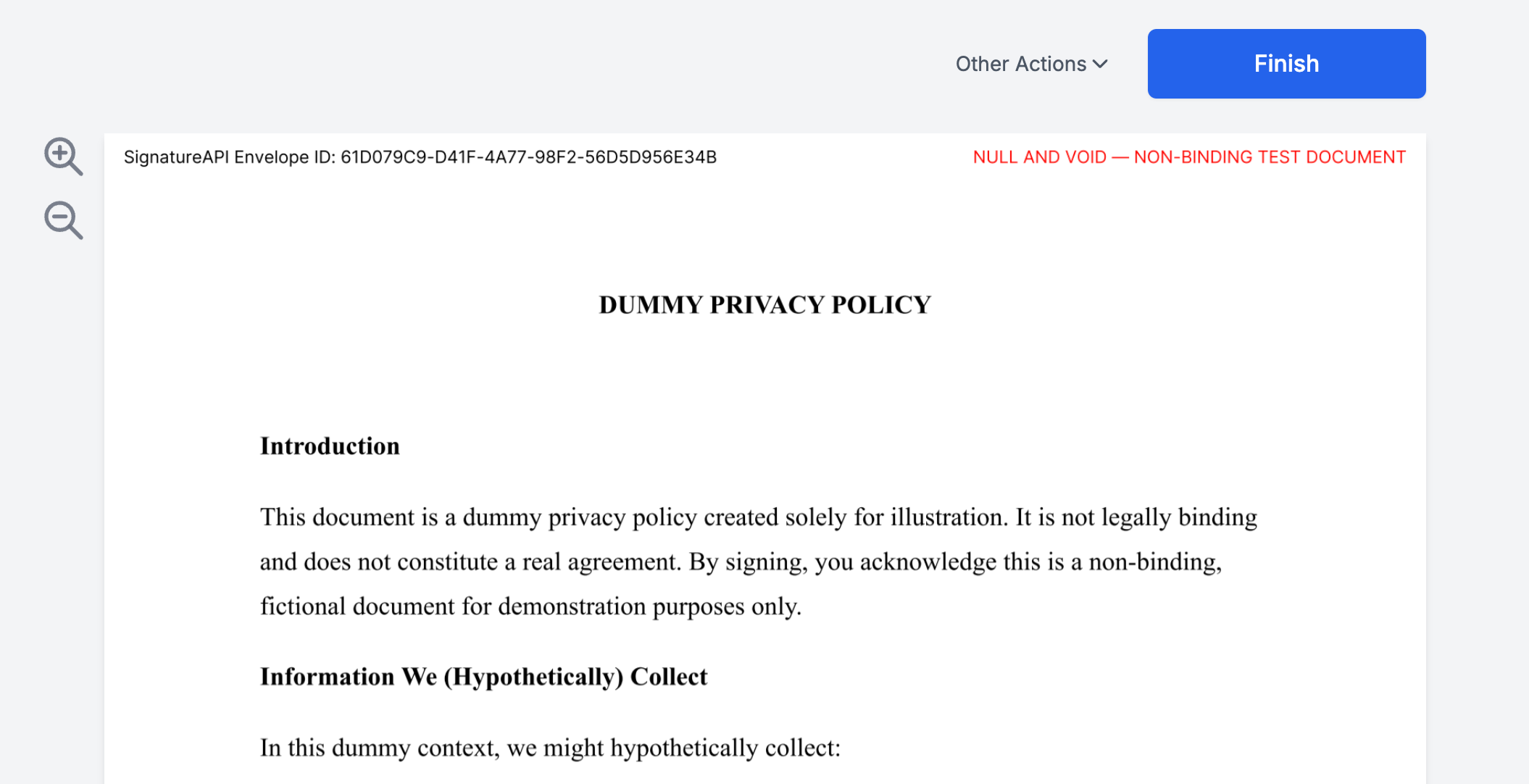
The signing ceremony showing the first page of the sample Service Agreement, marked as a non-binding test document, under a Start button
The signing ceremony, as Jane Doe

Check the envelope in the API

Once Jane has signed the document, check the status of the envelope and its recipient. Replace ENVELOPE_ID with the envelope id from the first response:

Terminal
curl https://api.signatureapi.com/v1/envelopes/ENVELOPE_ID \
     -H "X-API-Key: $SIGNATUREAPI_KEY"

The response is the same envelope, now completed:

{
  "id": "eb4cf433-a8af-4161-b37b-7ef57d423e56",
  "title": "Service Agreement",
  "label": null,
  "message": "Please review and sign the Service Agreement.",
  "status": "completed",
  "mode": "test",
  "routing": "sequential",
  "language": "en",
  "timezone": "UTC",
  "timestamp_format": "MM/DD/YYYY HH:mm:ss",
  "attestation": "none",
  "branding": {
    "logo": null,
    "accent_color": "#2463EB",
    "email": {
      "footer": null,
      "logo_position": "left",
      "from": "noreply@signatureapi.com"
    }
  },
  "sender": {
    "name": "Acme Corp Legal",
    "email": "legal@acme.example",
    "organization": "Acme Corp"
  },
  "topics": [],
  "metadata": {},
  "documents": [
    {
      "id": "doc_4YvlxUZN28CeonDq6rTbvk",
      "envelope_id": "eb4cf433-a8af-4161-b37b-7ef57d423e56",
      "key": "document_0",
      "title": null,
      "page_count": 1,
      "url": "https://pub-9cb75390636c4a8a83a6f76da33d7f45.r2.dev/docs-samples/service-agreement.pdf",
      "format": "pdf",
      "fixed_positions": [
        {
          "place_key": "client_signature",
          "page": 1,
          "top": 270,
          "left": 72
        }
      ],
      "places": [
        {
          "key": "client_signature",
          "type": "signature",
          "recipient_key": "client",
          "height": 60
        }
      ]
    }
  ],
  "recipients": [
    {
      "id": "re_49r1R2jpPDz8hSpP75ZkPp",
      "envelope_id": "eb4cf433-a8af-4161-b37b-7ef57d423e56",
      "type": "signer",
      "key": "client",
      "email": "jane.doe@example.com",
      "name": "Jane Doe",
      "ceremony": {
        "authentication": [
          {
            "type": "email_link",
            "subject_override": null,
            "message_override": null
          }
        ],
        "embeddable_in": [],
        "redirect_url": null,
        "redirect_delay": 3,
        "url": null,
        "url_variant": "standard"
      },
      "ceremony_creation": "automatic",
      "delivery_type": "email",
      "signature_options": [
        "typed",
        "drawn"
      ],
      "status": "completed",
      "status_updated_at": "2026-11-02T15:21:40.000Z",
      "completed_at": "2026-11-02T15:21:40.000Z"
    }
  ],
  "deliverable": {
    "id": "del_6FF89lKNyTNamOJCJd1tLL",
    "envelope_id": "eb4cf433-a8af-4161-b37b-7ef57d423e56",
    "name": null,
    "status": "processing",
    "type": "standard",
    "url": null,
    "password": null,
    "created_at": "2026-11-02T14:03:11.000Z",
    "generated_at": null,
    "timezone": "UTC",
    "language": "en",
    "timestamp_format": "MM/DD/YYYY HH:mm:ss",
    "included_documents": [
      "document_0"
    ]
  },
  "captures": {},
  "snapshot_url": null,
  "created_at": "2026-11-02T14:03:11.000Z",
  "completed_at": "2026-11-02T15:21:40.000Z"
}

Errors every call can return are in Errors and Authentication.

Here’s what to check:

  • Recipient Status: Inside the recipients array, the status should be marked as completed. This confirms Jane signed the document.
  • Envelope Status: The envelope (root) object’s status should also be set to completed, meaning the envelope process is finished as all the recipients signed the envelope.
  • Deliverable Status: The deliverable object may initially show a processing status, which indicates SignatureAPI is still generating the final signed document. This can take up to two minutes. You can repeat the GET request to check when it’s ready.

Once it’s ready, the deliverable status changes to generated, and its url is a download link for the signed PDF:

200 OK
{
  "id": "eb4cf433-a8af-4161-b37b-7ef57d423e56",
  "title": "Service Agreement",
  "label": null,
  "message": "Please review and sign the Service Agreement.",
  "status": "completed",
  "mode": "test",
  "routing": "sequential",
  "language": "en",
  "timezone": "UTC",
  "timestamp_format": "MM/DD/YYYY HH:mm:ss",
  "attestation": "none",
  "branding": {
    "logo": null,
    "accent_color": "#2463EB",
    "email": {
      "footer": null,
      "logo_position": "left",
      "from": "noreply@signatureapi.com"
    }
  },
  "sender": {
    "name": "Acme Corp Legal",
    "email": "legal@acme.example",
    "organization": "Acme Corp"
  },
  "topics": [],
  "metadata": {},
  "documents": [
    {
      "id": "doc_4YvlxUZN28CeonDq6rTbvk",
      "envelope_id": "eb4cf433-a8af-4161-b37b-7ef57d423e56",
      "key": "document_0",
      "title": null,
      "page_count": 1,
      "url": "https://pub-9cb75390636c4a8a83a6f76da33d7f45.r2.dev/docs-samples/service-agreement.pdf",
      "format": "pdf",
      "fixed_positions": [
        {
          "place_key": "client_signature",
          "page": 1,
          "top": 270,
          "left": 72
        }
      ],
      "places": [
        {
          "key": "client_signature",
          "type": "signature",
          "recipient_key": "client",
          "height": 60
        }
      ]
    }
  ],
  "recipients": [
    {
      "id": "re_49r1R2jpPDz8hSpP75ZkPp",
      "envelope_id": "eb4cf433-a8af-4161-b37b-7ef57d423e56",
      "type": "signer",
      "key": "client",
      "email": "jane.doe@example.com",
      "name": "Jane Doe",
      "ceremony": {
        "authentication": [
          {
            "type": "email_link",
            "subject_override": null,
            "message_override": null
          }
        ],
        "embeddable_in": [],
        "redirect_url": null,
        "redirect_delay": 3,
        "url": null,
        "url_variant": "standard"
      },
      "ceremony_creation": "automatic",
      "delivery_type": "email",
      "signature_options": [
        "typed",
        "drawn"
      ],
      "status": "completed",
      "status_updated_at": "2026-11-02T15:21:40.000Z",
      "completed_at": "2026-11-02T15:21:40.000Z"
    }
  ],
  "deliverable": {
    "id": "del_6FF89lKNyTNamOJCJd1tLL",
    "envelope_id": "eb4cf433-a8af-4161-b37b-7ef57d423e56",
    "name": null,
    "status": "generated",
    "type": "standard",
    "url": "https://vault.signatureapi.com/envelopes/eb4cf433-a8af-4161-b37b-7ef57d423e56/deliverables/del_6FF89lKNyTNamOJCJd1tLL/sealed.pdf?Signature=...",
    "password": null,
    "created_at": "2026-11-02T14:03:11.000Z",
    "generated_at": "2026-11-02T15:21:45.000Z",
    "timezone": "UTC",
    "language": "en",
    "timestamp_format": "MM/DD/YYYY HH:mm:ss",
    "included_documents": [
      "document_0"
    ]
  },
  "captures": {},
  "snapshot_url": null,
  "created_at": "2026-11-02T14:03:11.000Z",
  "completed_at": "2026-11-02T15:21:40.000Z"
}

Errors every call can return are in Errors and Authentication.

Check the envelope in the Dashboard

The deliverable is also sent to the recipients. In this case, Jane. To view the email Jane received with the completed document, follow these steps:

  1. Go to the envelope page in your Dashboard.
  2. Verify that the envelope is marked as completed.
  3. In the Emails section, you’ll see all the emails related to this envelope. Look for the one sent to Jane titled “Completed: Service Agreement”.
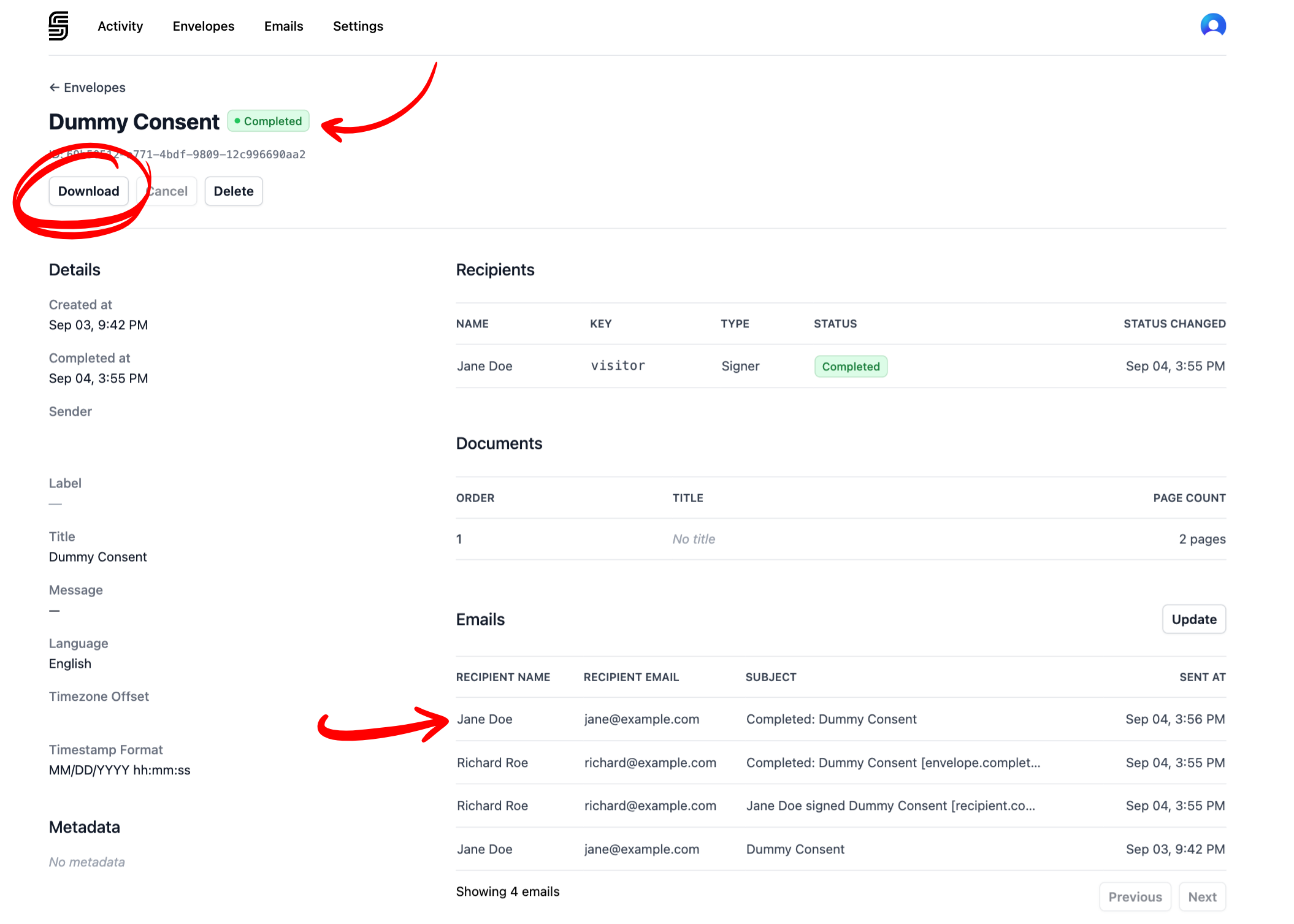
The completed Service Agreement envelope page with the Download button, Jane Doe's status Completed, and its emails, including Completed: Service Agreement sent to Jane Doe
Envelopes > Service Agreement, completed

You’ll also notice that two additional notifications were sent to the account owner. These notify you that Jane signed the envelope and that the envelope process is fully completed.

From the envelope page, you can download the signed document (the deliverable) by clicking the Download button.

What’s Next

You’ve just scratched the surface of what SignatureAPI can do. Here are a few features to explore next: