

Webhooks
Set Up Webhooks
Register a webhook endpoint in the Dashboard, verify each request's signature against the raw body, and acknowledge events so SignatureAPI stops retrying.
Webhooks let you receive real-time notifications when events happen in your SignatureAPI account, such as when a recipient signs, an envelope completes, or an email bounces. Instead of polling the API, SignatureAPI sends an HTTP POST request to your endpoint each time an event occurs.
Create a Webhook Endpoint
Webhook endpoints are registered in the Dashboard. You can create separate endpoints for test and live modes, and choose which event types each endpoint receives.
Open the Webhooks settings
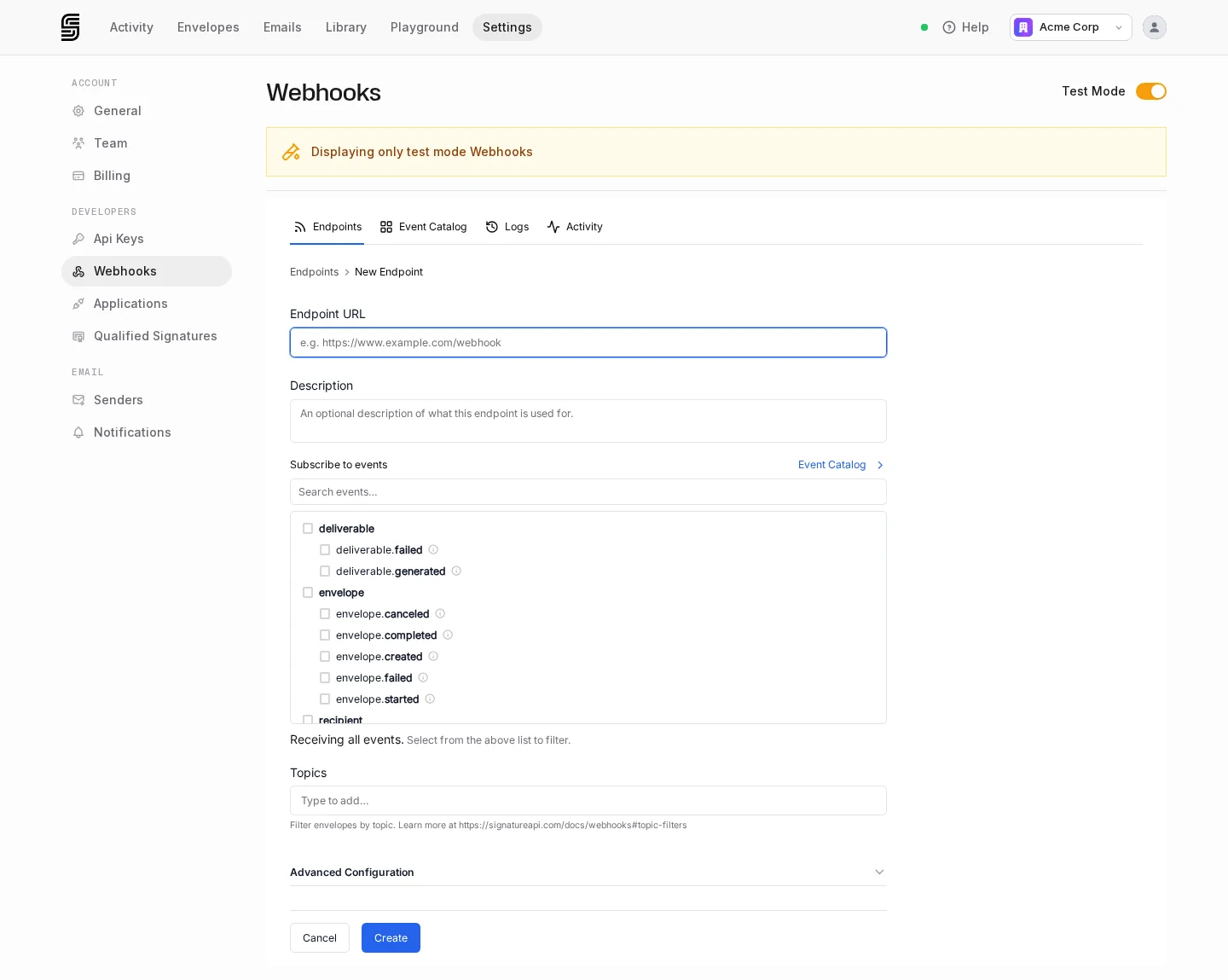
Go to Dashboard > Settings > Webhooks. On the Endpoints tab, add an endpoint. The New Endpoint form opens.
Configure your endpoint
Enter the URL of your webhook endpoint, select the events you want to receive, and save. You can subscribe to individual event types or receive all events.
Copy the signing secret
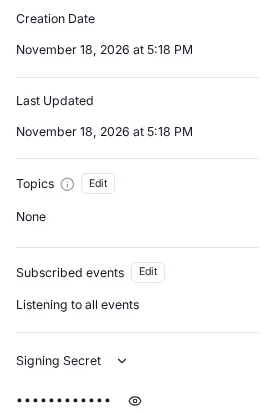
After saving, copy the Signing Secret from the right column of your endpoint definition. You will use this to verify that incoming requests are from SignatureAPI.
Webhook Payload
When an event occurs, SignatureAPI sends a POST request to your endpoint with the Event object as the JSON body.
Here is an example payload for a recipient.completed event:
{
  "id": "evt_4GpGD1cNnrkemsTLAvPW9G",
  "type": "recipient.completed",
  "timestamp": "2026-11-02T15:21:40.000Z",
  "data": {
    "object_id": "re_49r1R2jpPDz8hSpP75ZkPp",
    "object_type": "recipient",
    "envelope_id": "eb4cf433-a8af-4161-b37b-7ef57d423e56",
    "envelope_metadata": {
      "deal_id": "50055",
      "deal_owner": "jsmith"
    },
    "recipient_type": "signer",
    "recipient_key": "client"
  }
}
Every event includes a top-level id, type, and timestamp, along with a data object whose shape depends on the event type. The envelope_metadata property reflects any custom metadata you attached to the envelope when creating it.
Some common event types:
| Event type | When it fires |
|---|---|
envelope.created | A new envelope is created |
envelope.started | The envelope finishes processing and recipients are notified |
envelope.completed | All recipients have completed the envelope |
envelope.canceled | The envelope is explicitly canceled |
recipient.completed | A recipient finishes their signing step |
recipient.soft_bounced | A notification email to a recipient bounced |
For the full list of event types, see Envelope Events, Recipient Events, Deliverable Events, and Sender Events.
Verify the Signature
Every webhook request includes three headers: webhook-id, webhook-timestamp and webhook-signature. Always verify them to confirm the request came from SignatureAPI and was not tampered with.
SignatureAPI follows the Standard Webhooks specification. SignatureAPI signs the string webhook-id.webhook-timestamp.body with HMAC-SHA256, keyed with your endpoint’s signing secret. Your endpoint recomputes the same signature and compares:
Diagram as text
Parts
- Event: Something changes on an envelope, recipient, deliverable or sender.
- Sign: HMAC-SHA256 of `webhook-id.webhook-timestamp.body`, keyed with the endpoint's signing secret.
- POST request: The JSON body plus the `webhook-id`, `webhook-timestamp` and `webhook-signature` headers.
- Read the raw body: Keep the bytes exactly as they arrived. A parsed and re-serialized body no longer matches.
- Recompute: The same HMAC with the same secret. Also check that `webhook-timestamp` is recent.
- Compare: A match: parse the JSON and process the event. No match: reject the request.
Connections
- Event to Sign
- Sign to POST request: signature
- POST request to Read the raw body: HTTPS
- Read the raw body to Recompute
- Recompute to Compare
The Standard Webhooks project provides verification libraries for most languages, so you don’t need to implement the HMAC logic yourself. The libraries also reject requests whose timestamp is too old, which stops replayed requests.
Verify the raw request body, exactly as it arrived. If a framework parses the JSON first and you serialize it again, the bytes change and verification fails. Parse the JSON only after verification passes. For example, with Express in Node.js:
import express from "express";
import { Webhook } from "standardwebhooks";

const app = express();
const wh = new Webhook(process.env.SIGNATUREAPI_WEBHOOK_SECRET);

// express.raw keeps the body as bytes, so the signature can be checked
app.post("/webhooks/signatureapi", express.raw({ type: "application/json" }), (req, res) => {
  let event;
  try {
    event = wh.verify(req.body.toString("utf8"), {
      "webhook-id": req.header("webhook-id"),
      "webhook-timestamp": req.header("webhook-timestamp"),
      "webhook-signature": req.header("webhook-signature"),
    });
  } catch {
    return res.status(400).send("Invalid signature");
  }

  // event is the verified, parsed JSON payload
  console.log(event.type, event.data.envelope_id);
  res.status(200).send("OK");
});
Libraries are available for JavaScript and TypeScript, Python, Java and Kotlin, Rust, Go, Ruby, PHP, C#, and Elixir.
Use the Signing Secret you copied from the Dashboard as the secret. Keep it on your server, for example in an environment variable.
Complete receivers for Express, Next.js, FastAPI, Django, Laravel, Rails, Spring Boot and ASP.NET Core are on GitHub: webhooks.
Respond to Webhooks
Your endpoint must return a response with a status code in the 2XX range (200 to 299) to acknowledge that the event was received successfully. Any other status code is treated as a failed delivery.
id it has already processed.If delivery fails, SignatureAPI retries each event for up to 48 hours using an exponential backoff strategy. If your endpoint is down longer, events older than 48 hours at recovery are not redelivered; fetch them from the events endpoint.
Filter by Topic
By default, your webhook endpoint receives events for all envelopes in the selected mode. If you need to route events from specific envelopes to a particular endpoint, use topic filters.
When creating an envelope, include up to 10 topics in the topics array of the Envelope object. When configuring your webhook endpoint, specify the topics it should receive events for. Only envelopes tagged with a matching topic will trigger that endpoint.
Testing
These tools are useful for testing your webhook setup before connecting a real backend:
- SignatureAPI CLI:
npx signatureapi listen --forward-to <local URL>registers a test-mode endpoint, saves its signing secret into your.envfile, and delivers events to your local handler.npx signatureapi trigger <event-type>sends it an example event. - Webhook.site: Generates a temporary endpoint URL and lets you inspect incoming
POSTrequests in real time. Useful for verifying the payload structure. - ngrok: Creates a secure tunnel from a public URL to your local machine, so you can receive and process webhook events during local development.
Keep Learning
- Review the Webhooks reference for a complete overview of event delivery, retries, and authentication.
- Explore all event types and their payloads.
- Learn about test mode to safely develop and test your integration without affecting live data.