
Recipient authentication
Email Link Authentication
Authenticate recipients with a secure link sent to their email address.
With email link authentication, SignatureAPI sends the recipient an email with a direct link. Clicking the link authenticates the recipient and opens their signing session.
This is the default authentication method. If you don’t specify a ceremony configuration, SignatureAPI uses email link authentication automatically.
When to use
Email link authentication works well when:
- You want the simplest experience for recipients.
- Recipients check email to access documents.
- You don’t need to control the ceremony URL or deliver it through other channels.
- Your security requirements allow email-based authentication.
Creating an email link ceremony
You can create an email link ceremony automatically when creating an envelope, or manually using the Create Ceremony endpoint.
On envelope creation (automatic)
By default, SignatureAPI creates an email link ceremony and sends the invitation email when you create an envelope.
// POST https://api.signatureapi.com/v1/envelopes
// X-API-Key: key_test_...
// Content-Type: application/json

{
    "title": "Service Agreement",
    "recipients": [
        {
            "type": "signer",
            "key": "client",
            "name": "John Doe",
            "email": "john.doe@example.com"
        }
    ],
    "documents": [ /* ... */ ]
}
To add ceremony options such as a redirect URL, set the ceremony property explicitly.
// POST https://api.signatureapi.com/v1/envelopes
// X-API-Key: key_test_...
// Content-Type: application/json

{
    "title": "Service Agreement",
    "recipients": [
        {
            "type": "signer",
            "key": "client",
            "name": "John Doe",
            "email": "john.doe@example.com",
            "ceremony": {
                "authentication": [
                    {
                        "type": "email_link"
                    }
                ],
                "redirect_url": "https://www.example.com/redirect"
            }
        }
    ],
    "documents": [ /* ... */ ]
}
Create Ceremony endpoint (manual)
Use the Create Ceremony endpoint to create an email link ceremony after the envelope is created.
Creating a new ceremony automatically revokes any previous ceremony for that recipient. Only the most recent ceremony remains active.
// POST https://api.signatureapi.com/v1/recipients/{recipient_id}/ceremonies
// X-API-Key: key_test_...
// Content-Type: application/json

{
    "authentication": [
        {
            "type": "email_link"
        }
    ]
}
Email customization
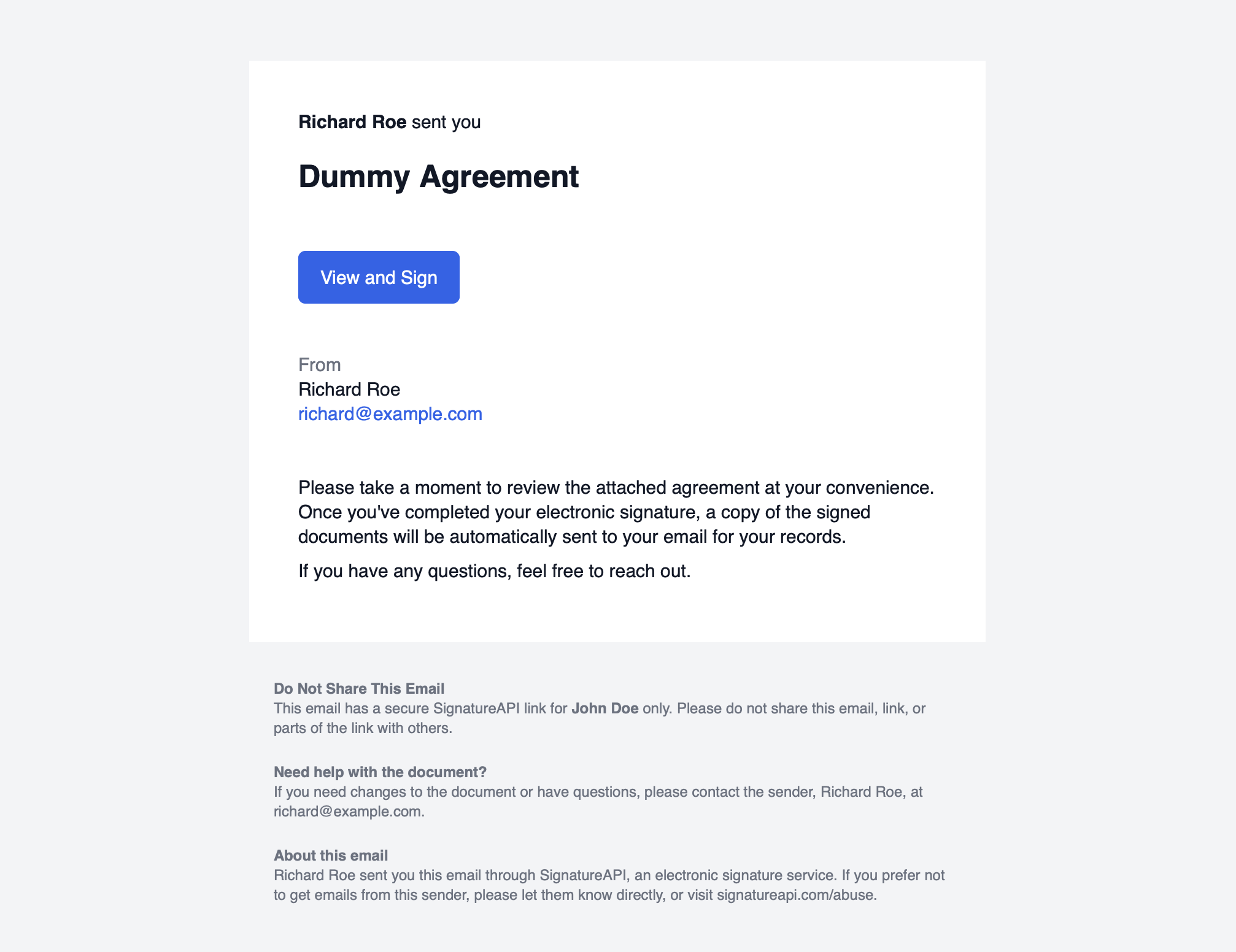
By default, SignatureAPI derives the email content from the envelope:
- Subject:
envelope.title - Message body:
envelope.message - Language:
envelope.language
For example, an envelope with:
{
  "title": "Dummy Agreement",
  "message": "Please take a moment to review the attached agreement. Once you complete your electronic signature, a signed copy will be sent to your email.\n\nIf you have questions, feel free to reach out."
}
produces an email similar to this:
Per-recipient overrides
Use subject_override and message_override on the email_link authentication object to customize the email for a specific recipient.
// POST https://api.signatureapi.com/v1/envelopes
// X-API-Key: key_test_...
// Content-Type: application/json

{
    "title": "Service Agreement",
    "recipients": [
        {
            "type": "signer",
            "key": "client",
            "name": "John Doe",
            "email": "john.doe@example.com",
            "ceremony": {
                "authentication": [
                    {
                        "type": "email_link",
                        "subject_override": "Action Required: Please sign the Service Agreement",
                        "message_override": "Dear John,\n\nPlease review and sign the attached Service Agreement at your earliest convenience."
                    }
                ]
            }
        }
    ],
    "documents": [ /* ... */ ]
}
message_override supports Markdown formatting: **bold**, *italic*, and \n\n for paragraph breaks.
To send invitation emails through your own infrastructure with custom branding, use Custom Authentication to obtain the ceremony URL and deliver it yourself.
Audit log
When a recipient clicks the email link, SignatureAPI records the timestamp. The audit log entry looks like this: