

Overview
Getting Started
Start using the SignatureAPI connector in Power Automate
The SignatureAPI connector lets you add electronic signatures to your Power Automate flows.
Get a Test API Key
To use SignatureAPI in Power Automate, you need an API key.
You can start with a free test API key to try out the platform. Here’s how:
Sign Up
Sign up for a free SignatureAPI account.
Get your API key
Go to the API Key section in your SignatureAPI settings to get your test key.
Test API keys let you create test envelopes. These are useful when building and testing your flows. Test envelopes:
- Don’t send emails to recipients, but you can see them in the Email section of your dashboard.
- Are not legally binding.
- Are free to use.
Create a Connection
Use your test API key to create a connection to SignatureAPI in Power Automate:
Open a Power Automate flow
In Power Automate, open an existing flow or create a new one.
Add a SignatureAPI action
Add the Create Envelope action from SignatureAPI.
Create your connection
Enter a name for your connection (for example, SignatureAPI Test) and paste your test API key.
Learn more about API keys and how to create them.
Your First SignatureAPI Flow
Follow our Quickstart to create an envelope and send it with SignatureAPI.
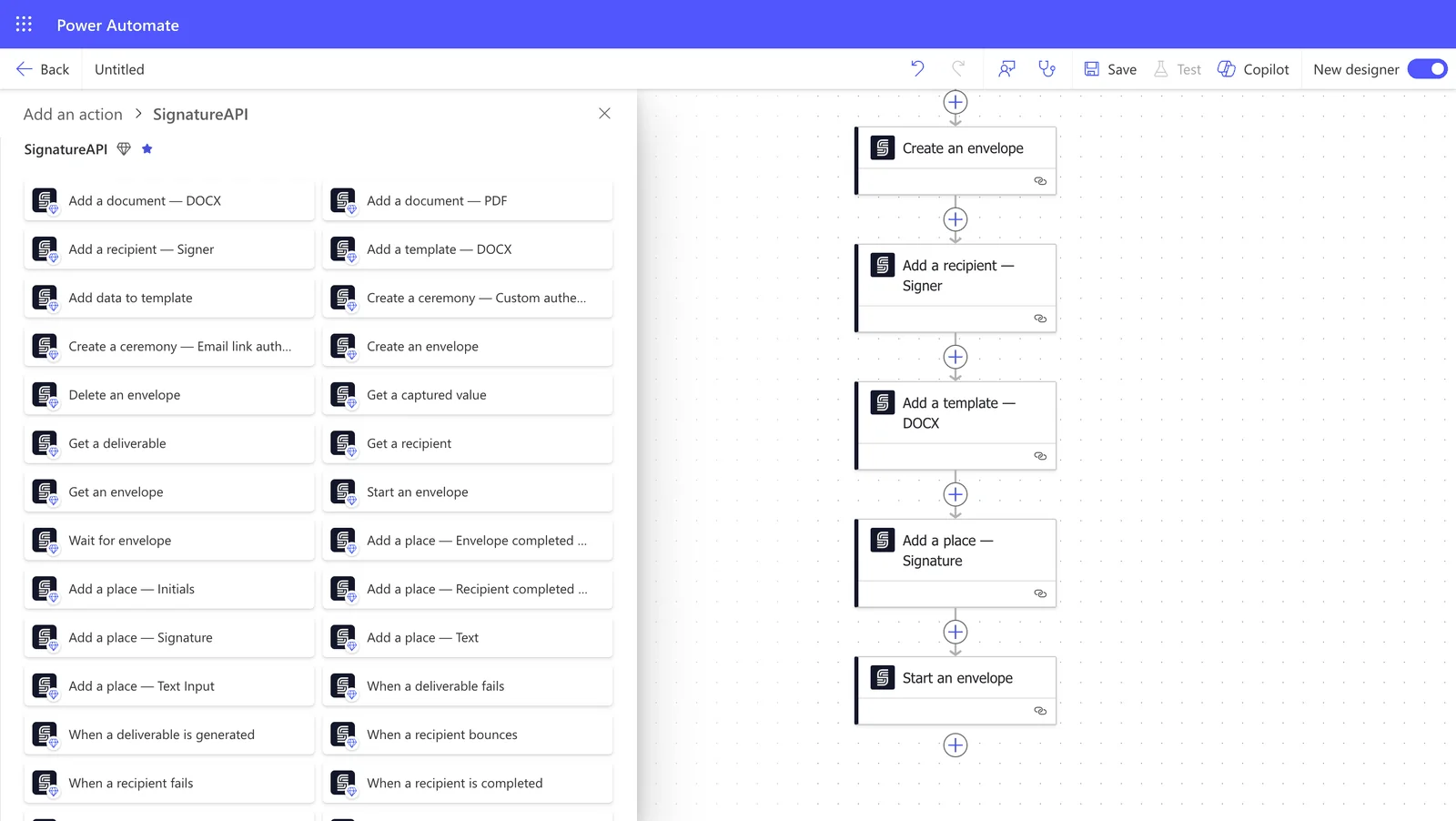
A signature flow in Power Automate
Connector actions build the envelope, start it, wait for the signer and fetch the signed PDF.
Transcript
- A connection holds your API key. Start with a test key: test envelopes are free and send no email.
- Create an envelope makes a new envelope and returns its ID for the next actions.
- Add a recipient: Signer adds the person who signs.
- Add a document (PDF or DOCX) or Add a template (DOCX) puts the file in the envelope.
- Add a place marks where the signer signs.
- Start an envelope sends it for signing.
- Wait for envelope pauses the flow while the signer signs, until the envelope reaches a final status.
- Get a deliverable downloads the signed PDF, for example to save it with Create file.
- To react in a separate flow instead of waiting, start it with a trigger such as When a deliverable is generated.
Switch to Live Mode
When you’re ready to send legally binding envelopes, add a payment method and get a live API key. Live envelopes:
- Send emails to recipients. You can also view these emails in your dashboard.
- Are legally binding.
- Are billed.
We recommend creating a new connection with your live API key. You can name it something like SignatureAPI Live.