

SignatureAPI for n8n
Send documents for signature from n8n with the HTTP Request node and one Header Auth credential, store templates, and receive signed PDFs by webhook.
n8n calls the SignatureAPI REST API through its built-in HTTP Request node. You need one credential and no community node. Every workflow on these pages ran end to end on n8n 2.43.4 in test mode.
What you can build
- Employment contract: your HR system posts a new hire, HR approves, then the employer and the employee sign.
- Signed PDF on completion: receive
deliverable.generated, verify the signature, download the signed PDF. - NDA batch: one mutual NDA per row, paced to stay inside the rate limit.
- Lease renewal: every morning, send a renewal for each lease that ends in the next 60 days.
- Invoice approval: a manager approves an invoice PDF, then finance signs it off.
- Form to envelope: an n8n form that sends an offer letter to sign.
Import the finished workflows from GitHub: no-code/n8n.
Create the credential
Every request to SignatureAPI carries your API key in the X-API-Key header. In n8n, keep the key in a Header Auth credential, not in the node.
Add a Header Auth credential
In n8n, create a credential of type Header Auth. Name it SignatureAPI test key.
Fill in the header
Set Name to X-API-Key and Value to your test API key from the Dashboard. Save.
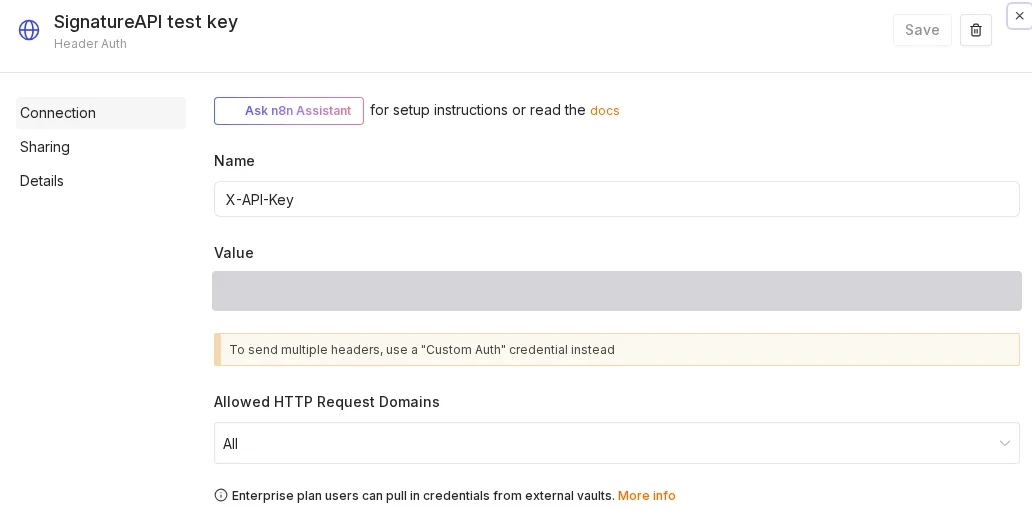
The key decides the mode. A test key creates test envelopes: free, not legally binding, and no email reaches your recipients. Change the credential’s value to a live key when you are ready to send real documents. The workflows stay the same.
Call the API from an HTTP Request node
Point an HTTP Request node at the endpoint, select the credential, and send the request body as JSON. These settings create an envelope:
HTTP Request node
Settings for the "Minimal" request.
| Setting | Value |
|---|---|
| Method | POST |
| URL | https:// |
| Authentication | Generic Credential Type, Generic Auth Type: Header Auth Create a Header Auth credential with Name |
| Send Body | On |
| Body Content Type | JSON |
| Specify Body | Using JSON |
| JSON | The JSON below. |
{
  "title": "Service Agreement",
  "message": "Please review the agreement and provide your signature.",
  "routing": "parallel",
  "documents": [
    {
      "key": "service_agreement",
      "title": "Service Agreement",
      "url": "https://pub-9cb75390636c4a8a83a6f76da33d7f45.r2.dev/docs-samples/acme-service-agreement.pdf",
      "format": "pdf",
      "places": [
        {
          "key": "client_signs_here",
          "type": "signature",
          "recipient_key": "client"
        },
        {
          "key": "provider_signs_here",
          "type": "signature",
          "recipient_key": "provider"
        }
      ]
    }
  ],
  "recipients": [
    {
      "type": "signer",
      "key": "client",
      "name": "Jane Doe",
      "email": "jane.doe@example.com"
    },
    {
      "type": "signer",
      "key": "provider",
      "name": "John Smith",
      "email": "john.smith@example.com"
    }
  ]
}
Setting names as in the n8n documentation.
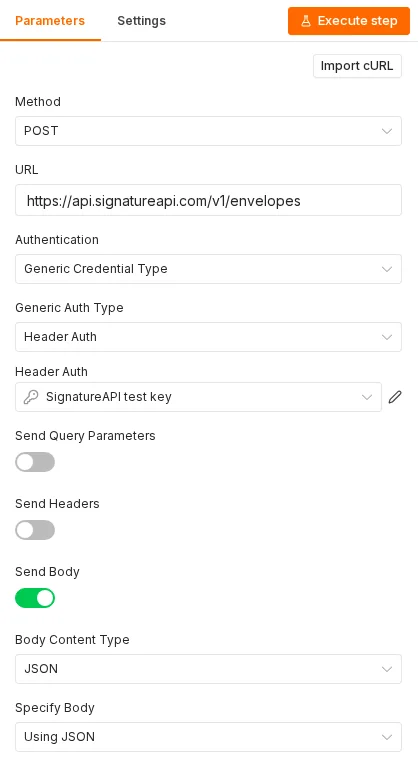
The workflows on these pages build the body in a Code node first and send it with JSON set to {{ JSON.stringify($json.envelope) }}. A Code node handles nested objects and arrays more clearly than an expression in the JSON field.
To pass the API’s error back to the caller instead of stopping the workflow, change the node’s response options. In Options > Response, turn on Include Response Headers and Status and Never Error, and set Response Format to JSON. API errors use the application/problem+json content type, which n8n otherwise returns as plain text. The employment contract workflow uses these options.
Store your templates once
The template workflows merge data into a DOCX file that SignatureAPI already stores. An upload expires after 24 hours unless you store it. Upload each template once and keep its URL.
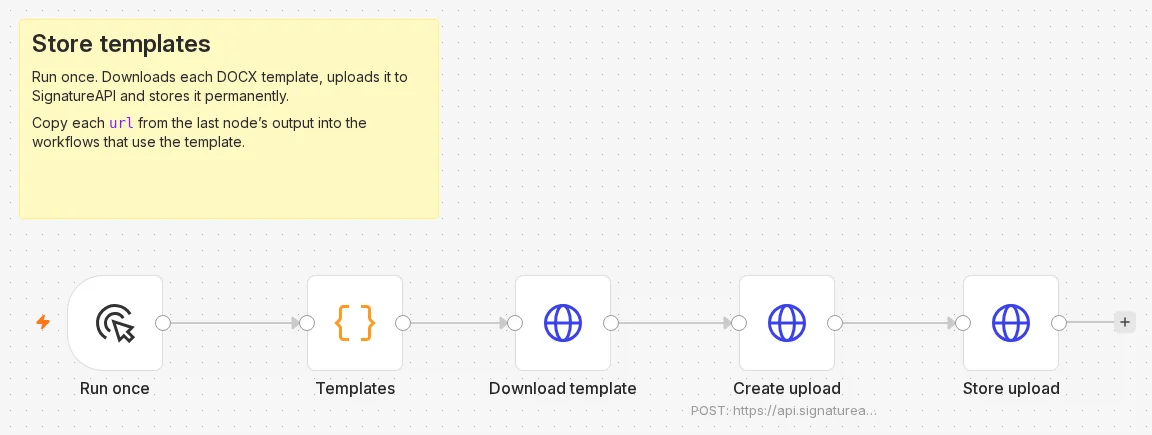
You can upload a file in the Dashboard Library, or let n8n do it with one manual workflow:
- Manual Trigger.
- Code node that returns one item per template, each with a
key(a unique name, such asemployment-contract) and asource_urlto download the file from. - HTTP Request node,
GET{{ $json.source_url }}, with Options > Response > Response Format set to File. - HTTP Request node,
POSThttps://api.signatureapi.com/v1/uploadswith the credential. Turn on Send Headers withContent-Typeset toapplication/vnd.openxmlformats-officedocument.wordprocessingml.document. Turn on Send Body, set Body Content Type to n8n Binary File and Input Data Field Name todata. - HTTP Request node,
POSThttps://api.signatureapi.com/v1/uploads/{{ $json.id }}/storewith the credential and the JSON body{{ JSON.stringify({ key: $('Templates').item.json.key }) }}. HereTemplatesis the name of the Code node in step 2.
The last node returns each stored upload with retention: "permanent" and its url, such as https://api.signatureapi.com/v1/uploads/upl_3JJz6t1o8A5YjX5VpnX27Z. Use that URL as the document url in your envelopes.
Receive events
Add a Webhook node to react when an envelope changes. Register its production URL as a webhook endpoint in the Dashboard. Verify every delivery’s signature before you act on it. The signed PDF workflow shows a Code node that checks the signature and the n8n settings it needs.
Troubleshooting
- The webhook answers
502with a422body. The API refused the envelope. The body’serrorsordetailsays which field. A documenturlthat SignatureAPI cannot fetch returns an error that links to the supported hosts; use an upload URL instead. access to env vars deniedin a Code node. The instance blocks$env. See Signed PDF on completion.- A production webhook URL answers
404. The workflow is not active. Activate (publish) it, then call the production URL again.