

Workflows
Send an envelope from an n8n form
An n8n workflow with a built-in Form Trigger that merges each submission into an offer letter template and sends it to the candidate to sign.
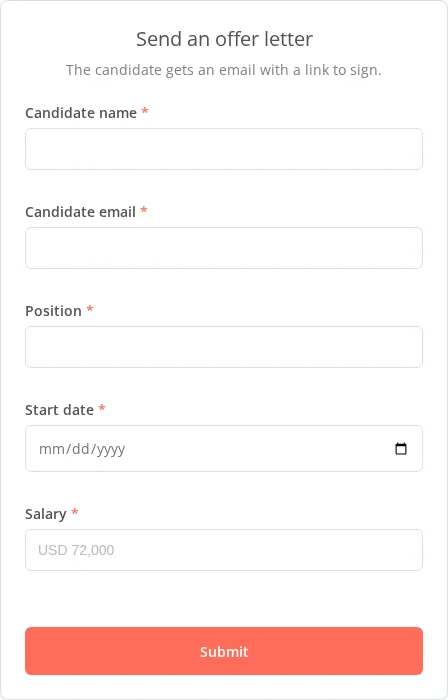
Your team fills in an n8n form. Each submission merges the answers into an offer letter template and sends it to the candidate to sign. The form then shows the new envelope’s id.
Before you start
- The Header Auth credential named
SignatureAPI test key.
The workflow uses the public sample offer letter template, so it runs without storing a template first. Its merge fields are candidateName, position, startDate and salary, and its placeholder is [[candidate_signs_here]].
How the workflow runs
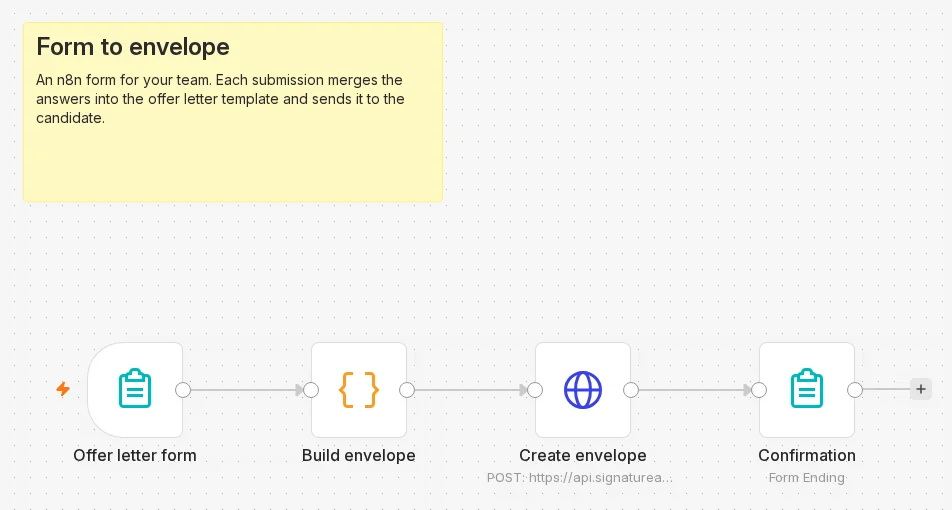
- Offer letter form (n8n Form Trigger) serves the form and receives each submission.
- Build envelope (Code) turns the answers into an envelope body.
- Create envelope (HTTP Request) sends it to
POST /v1/envelopes. - Confirmation (n8n Form, Form Ending) shows the result to the person who submitted the form.
For the finished workflow, download form-to-envelope.json from GitHub and import it into n8n.
Build it
Offer letter form: the n8n Form Trigger
Add an n8n Form Trigger. Set Form Title to Send an offer letter and add five required fields. Their labels become the keys the next node reads:
| Label | Element Type |
|---|---|
| Candidate name | Text Input |
| Candidate email | |
| Position | Text Input |
| Start date | Date |
| Salary | Text Input |
Under Options, add Form Path and set it to offer-letter.
Build envelope: a Code node
Add a Code node in Run Once for All Items mode:
// Builds an offer letter envelope from the form answers.
// The template's merge fields are candidateName, position, startDate and salary; its placeholder is [[candidate_signs_here]].
const TEMPLATE_URL = 'https://pub-9cb75390636c4a8a83a6f76da33d7f45.r2.dev/docs-samples/acme-offer-letter-template.docx';
const a = $input.first().json;

const envelope = {
  title: `Offer letter: ${a['Candidate name']}`,
  message: 'Please review and sign your offer letter.',
  documents: [
    {
      key: 'offer',
      url: TEMPLATE_URL,
      format: 'docx',
      data: { candidateName: a['Candidate name'], position: a['Position'], startDate: a['Start date'], salary: a['Salary'] },
      places: [{ key: 'candidate_signs_here', type: 'signature', recipient_key: 'candidate' }],
    },
  ],
  recipients: [{ type: 'signer', key: 'candidate', name: a['Candidate name'], email: a['Candidate email'] }],
};

return [{ json: { envelope } }];
To use your own template, store it and put its URL in TEMPLATE_URL. See Store your templates once.
Create envelope: the HTTP Request node
Add an HTTP Request node:
| Setting | Value |
|---|---|
| Method | POST |
| URL | https://api.signatureapi.com/v1/envelopes |
| Authentication | Generic Credential Type, Generic Auth Type Header Auth, credential SignatureAPI test key |
| Send Body | On, Body Content Type JSON, Specify Body Using JSON |
| JSON | {{ JSON.stringify($json.envelope) }} |
Confirmation: the Form Ending page
Add an n8n Form node with Page Type set to Form Ending and On n8n Form Submission set to Show Completion Screen. Set Completion Title to Offer letter sent and Completion Message to Envelope {{ $json.id }} was created with status {{ $json.status }}.
Activate the workflow
Activate (publish) the workflow. The form is at https://<your-n8n>/form/offer-letter.
Try it
Open the form, fill it in with a test candidate, and submit. The completion screen shows Offer letter sent with the envelope id. The envelope is in_progress with the candidate’s signing request sent.
If Create envelope fails, the workflow stops at that node, and the execution list shows the API’s error.
Make it yours
- More fields. Add a form field, then read it in Build envelope by its label, for example
a['Department'], and pass it to a merge field. - Who may use the form. The form URL is public. Restrict access with the Form Trigger’s authentication or IP options when the form sends real documents.
- The signed letter. Add the signed PDF workflow to file the signed offer.