

Workflows
Approve invoices with n8n and SignatureAPI
An n8n workflow that sends an invoice PDF to a manager for approval, then to finance for a sign-off signature, from a webhook your accounting system calls.
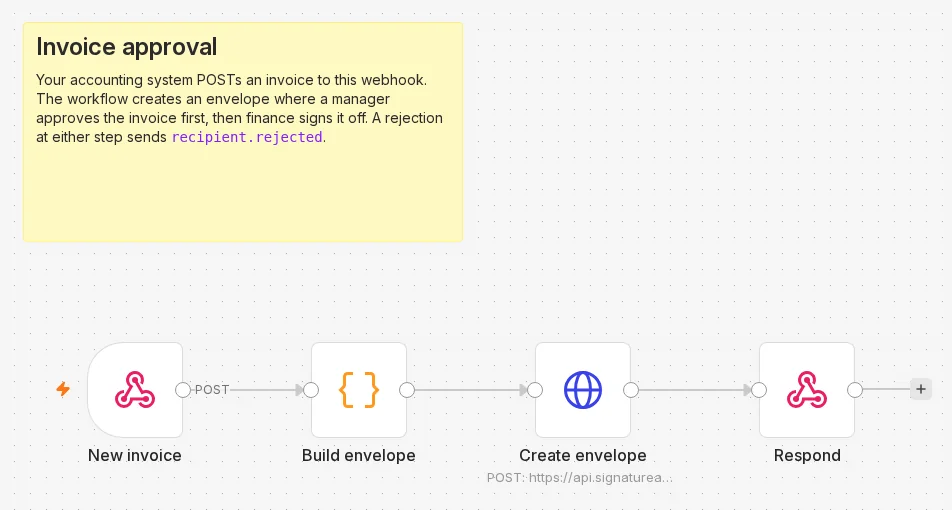
Your accounting system posts an invoice to an n8n webhook. The workflow creates an envelope in which a manager approves the invoice first, then finance signs it off. If either of them rejects it, SignatureAPI sends the recipient.rejected event.
Every envelope needs at least one signing recipient. An approver alone is not enough, so finance signs the invoice off. See Approver.
Before you start
- The Header Auth credential named
SignatureAPI test key. - An invoice PDF at a URL SignatureAPI can fetch: an upload URL, or a file on a supported host.
How the workflow runs
- New invoice (Webhook) receives the invoice.
- Build envelope (Code) checks the request and builds the envelope body.
- Create envelope (HTTP Request) sends it to
POST /v1/envelopes. - Respond (Respond to Webhook) answers with the envelope id, or with the API’s error.
For the finished workflow, download invoice-approval.json from GitHub and import it into n8n.
Build it
New invoice: the Webhook node
Add a Webhook node. Set HTTP Method to POST, Path to invoice-approval, and Respond to Using ‘Respond to Webhook’ Node.
Build envelope: a Code node
Add a Code node in Run Once for All Items mode:
// Builds an approval envelope for the invoice your accounting system sends to this webhook.
// Request body: invoice_number, vendor, amount, currency, pdf_url (a URL SignatureAPI can fetch, such as an upload URL),
// approver { name, email } who reviews it, and signer { name, email } who signs it off.
const input = $input.first().json.body;
for (const field of ['invoice_number', 'vendor', 'amount', 'currency', 'pdf_url']) {
  if (!input?.[field]) throw new Error(`The request needs ${field}`);
}
for (const person of ['approver', 'signer']) {
  if (!input[person]?.name || !input[person]?.email) throw new Error(`The request needs ${person}.name and ${person}.email`);
}

const envelope = {
  title: `Invoice ${input.invoice_number} from ${input.vendor}: ${input.currency} ${input.amount}`,
  message: 'Please review this invoice.',
  routing: 'sequential', // the approver reviews first; the signer gets it only after approval
  topics: ['invoices'],
  metadata: { invoice_number: String(input.invoice_number) },
  documents: [
    {
      key: 'invoice',
      url: input.pdf_url,
      format: 'pdf',
      places: [{ key: 'signoff', type: 'signature', recipient_key: 'signer' }],
      fixed_positions: [{ place_key: 'signoff', page: 1, top: 680, left: 72 }],
    },
  ],
  recipients: [
    { type: 'approver', key: 'approver', name: input.approver.name, email: input.approver.email },
    { type: 'signer', key: 'signer', name: input.signer.name, email: input.signer.email },
  ],
};

return [{ json: { envelope } }];
The sign-off place sits on page 1, 680 points from the top and 72 from the left. That is near the bottom-left corner of a Letter or A4 page. Move it to free space on your invoices. See fixed positions. The invoices topic lets a webhook endpoint receive events for these envelopes only. See topic filters.
Create envelope: the HTTP Request node
Add an HTTP Request node:
| Setting | Value |
|---|---|
| Method | POST |
| URL | https://api.signatureapi.com/v1/envelopes |
| Authentication | Generic Credential Type, Generic Auth Type Header Auth, credential SignatureAPI test key |
| Send Body | On, Body Content Type JSON, Specify Body Using JSON |
| JSON | {{ JSON.stringify($json.envelope) }} |
| Options > Response | Include Response Headers and Status on, Never Error on, Response Format JSON |
Respond: the Respond to Webhook node
Add a Respond to Webhook node. Set Respond With to JSON, and add the Response Code option.
- Response Body:
{{ JSON.stringify($json.statusCode === 201 ? { envelope_id: $json.body.id, status: $json.body.status } : $json.body) }} - Response Code:
{{ $json.statusCode === 201 ? 201 : 502 }}
Activate the workflow
Activate (publish) the workflow so https://<your-n8n>/webhook/invoice-approval accepts requests.
Try it
curl -X POST https://<your-n8n>/webhook/invoice-approval \
  -H 'Content-Type: application/json' \
  -d '{
    "invoice_number": "INV-1001",
    "vendor": "Globex Example Ltd",
    "amount": "4,250.00",
    "currency": "USD",
    "pdf_url": "https://api.signatureapi.com/v1/uploads/upl_3JJz6t1o8A5YjX5VpnX27Z",
    "approver": { "name": "Alex Chen", "email": "alex.chen@example.com" },
    "signer": { "name": "John Smith", "email": "john.smith@example.com" }
}'{ "envelope_id": "eb4cf433-a8af-4161-b37b-7ef57d423e56", "status": "processing" }The envelope becomes in_progress with the approver’s request sent. The signer gets the invoice only after the approver approves it.
Make it yours
- Act on the decision. Subscribe a second workflow to
envelope.completed(approved and signed off) andrecipient.rejected(refused at either step), and update the invoice in your accounting system.data.envelope_metadata.invoice_numberidentifies it in every event. A rejection does not cancel the envelope: cancel it from that workflow when a rejected invoice should go no further. - Keep the signed invoice. The signed PDF workflow downloads it with the audit log. Approver actions are not recorded in the audit log; the envelope’s events list them.