

Workflows
Send lease renewals from n8n on a schedule
An n8n workflow that runs every morning, finds leases ending in the next 60 days, and sends each tenant a one-year renewal that the landlord countersigns.
Every morning the workflow reads your leases and keeps the ones that end in the next 60 days. It sends each tenant a renewal for a new one-year term. The tenant signs first, then the landlord countersigns.
Before you start
- The Header Auth credential named
SignatureAPI test key. - The residential lease template stored in your account, and its upload URL. Download the template and store it once.
How the workflow runs
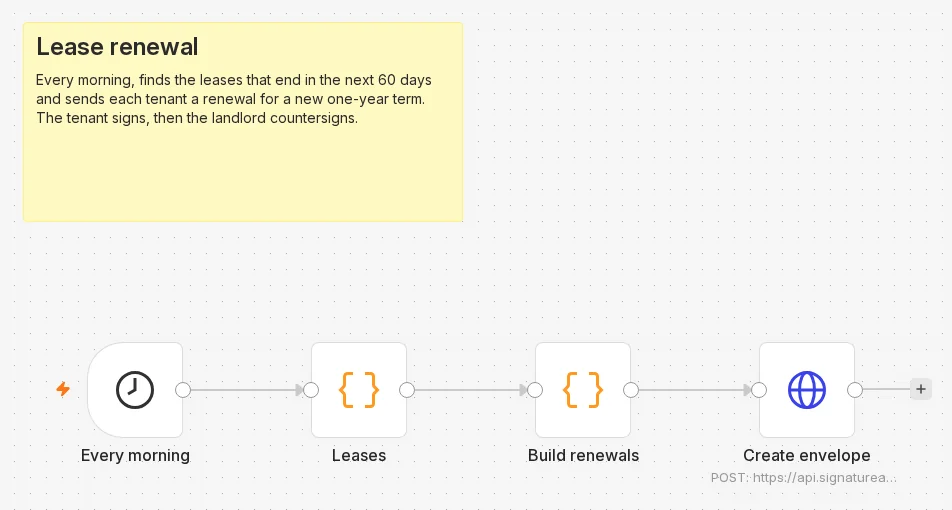
- Every morning (Schedule Trigger) starts the run at 9am, in the workflow’s time zone (or the instance’s, when the workflow has none).
- Leases (Code) returns your leases. Replace it with your property system or spreadsheet.
- Build renewals (Code) keeps the leases that end within 60 days and builds one envelope body for each.
- Create envelope (HTTP Request) sends each body to
POST /v1/envelopes.
For the finished workflow, download lease-renewal.json from GitHub and import it into n8n.
Build it
Every morning: the Schedule Trigger
Add a Schedule Trigger with Trigger Interval set to Days and Trigger at Hour set to 9am.
Leases: your lease list
Add a Code node that returns one item per lease. The sample computes its end dates from today, so one lease is always due:
// Leases from your property system. Replace this node with your source.
// The next node keeps the leases that end in the next 60 days.
const inDays = (n) => new Date(Date.now() + n * 86400000).toISOString().slice(0, 10);
return [
  { json: { unit: '42 Sample Avenue, Apartment 3B, Springfield', tenant_name: 'Maria Garcia', tenant_email: 'maria.garcia@example.com', current_end: inDays(45), monthly_rent: '1,850', deposit: '1,800', pets_allowed: false } },
  { json: { unit: '42 Sample Avenue, Apartment 5A, Springfield', tenant_name: 'Jane Doe', tenant_email: 'jane.doe@example.com', current_end: inDays(200), monthly_rent: '2,100', deposit: '2,000', pets_allowed: true } },
];Build renewals: due leases only
Add a Code node in Run Once for All Items mode. Replace REPLACE_WITH_YOUR_TEMPLATE_URL with your stored template’s URL:
// Keeps the leases ending in the next 60 days and builds a renewal envelope for each.
const TEMPLATE_URL = 'REPLACE_WITH_YOUR_TEMPLATE_URL'; // the stored residential-lease template
const LANDLORD = { name: 'Alex Chen', email: 'alex.chen@example.com' };
const DAY = 86400000;

const due = $input.all().filter(({ json: l }) => {
  const days = (new Date(l.current_end) - Date.now()) / DAY;
  return days >= 0 && days <= 60;
});

return due.map(({ json: lease }) => {
  const start = new Date(new Date(lease.current_end).getTime() + DAY);
  const end = new Date(start);
  end.setFullYear(end.getFullYear() + 1);
  end.setDate(end.getDate() - 1);
  const iso = (d) => d.toISOString().slice(0, 10);
  return {
    json: {
      unit: lease.unit,
      envelope: {
        title: `Lease renewal: ${lease.unit}`,
        message: 'Your lease renewal is ready to sign.',
        routing: 'sequential', // the tenant signs first, then the landlord countersigns
        metadata: { unit: lease.unit.slice(0, 1000) },
        documents: [
          {
            key: 'lease',
            url: TEMPLATE_URL,
            format: 'docx',
            data: {
              leaseDate: iso(new Date()),
              landlord: { name: LANDLORD.name },
              tenant: { name: lease.tenant_name },
              property: { address: lease.unit },
              startDate: iso(start),
              endDate: iso(end),
              currency: 'USD',
              monthlyRent: lease.monthly_rent,
              dueDay: '1',
              deposit: lease.deposit,
              petsAllowed: Boolean(lease.pets_allowed),
            },
            places: [
              { key: 'tenant_signs_here', type: 'signature', recipient_key: 'tenant' },
              { key: 'landlord_signs_here', type: 'signature', recipient_key: 'landlord' },
            ],
          },
        ],
        recipients: [
          { type: 'signer', key: 'tenant', name: lease.tenant_name, email: lease.tenant_email },
          { type: 'signer', key: 'landlord', name: LANDLORD.name, email: LANDLORD.email },
        ],
      },
    },
  };
});
The new term starts the day after the current lease ends and runs one year. petsAllowed chooses the template’s pet clause.
Create envelope: the HTTP Request node
Add an HTTP Request node:
| Setting | Value |
|---|---|
| Method | POST |
| URL | https://api.signatureapi.com/v1/envelopes |
| Authentication | Generic Credential Type, Generic Auth Type Header Auth, credential SignatureAPI test key |
| Send Body | On, Body Content Type JSON, Specify Body Using JSON |
| JSON | {{ JSON.stringify($json.envelope) }} |
| Options > Batching | Items per Batch 5, Batch Interval (ms) 1000 |
Activate the workflow
Activate (publish) the workflow so the schedule runs.
Try it
Select Execute at the bottom of the canvas to run it now. Of the two sample leases, only the one ending in 45 days is due. Create envelope shows 1 item: a test envelope in which the tenant has the signing request and the landlord waits.
Make it yours
- Send each renewal once. The workflow runs every day, and a lease stays inside the 60-day window for weeks. Mark a lease as sent in your source after Create envelope and skip marked leases in Build renewals, or narrow the window to a single day, such as exactly 60 days before the end date.
- Your terms. Change
monthlyRent, the term length or the window in Build renewals. Open the template to see its merge fields, or call Retrieve upload structure on its upload. - Know when it is signed. Add the signed PDF workflow.
data.envelope_metadata.unitnames the unit in every event.