

Workflows
Get the signed PDF in n8n when an envelope completes
An n8n workflow that receives the deliverable.generated webhook, verifies its signature on the raw body, and downloads the signed PDF for storage.
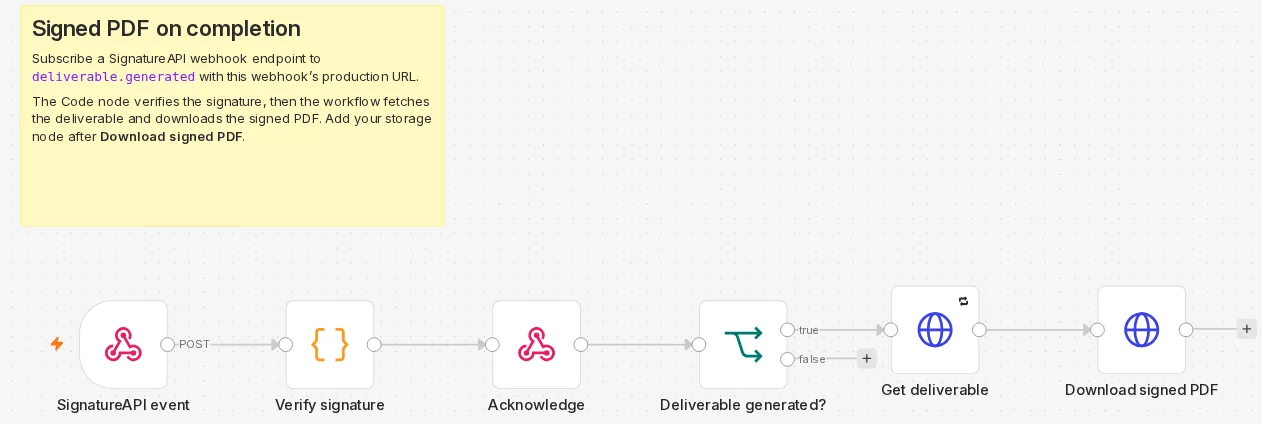
When every recipient has finished, SignatureAPI generates the deliverable: the signed documents with the audit log. This workflow receives the deliverable.generated event, checks that SignatureAPI sent it, and downloads the PDF. Add your storage node at the end.
Listen for deliverable.generated, not envelope.completed. The deliverable may still be generating when envelope.completed arrives. See Webhooks.
How the workflow runs
- SignatureAPI event (Webhook) receives the delivery with its raw body.
- Verify signature (Code) checks the
webhook-signatureheader and stops on a mismatch. - Acknowledge (Respond to Webhook) answers
204so SignatureAPI does not retry. - Deliverable generated? (If) lets only
deliverable.generatedthrough. - Get deliverable (HTTP Request) reads the deliverable, which returns a fresh download URL.
- Download signed PDF (HTTP Request) saves the PDF as binary data named
signed_pdf.
Configure n8n
The Code node reads the signing secret from an environment variable and loads the Node.js crypto module. Start n8n with these variables:
| Variable | Value | Why |
|---|---|---|
SIGNATUREAPI_WEBHOOK_SECRET | Your endpoint’s signing secret | The key the signature is checked with. |
NODE_FUNCTION_ALLOW_BUILTIN | crypto | n8n blocks module imports in the Code node unless you allow them (n8n docs). |
N8N_BLOCK_ENV_ACCESS_IN_NODE | false | Lets the Code node read $env (n8n docs). n8n 2.43.4 denied $env without it. |
These are instance settings, so this workflow needs an n8n instance whose environment you control.
For the finished workflow, download deliverable-on-completion.json from GitHub and import it into n8n.
Build it
SignatureAPI event: the Webhook node
Add a Webhook node. Set HTTP Method to POST, Path to signatureapi-events, and Respond to Using ‘Respond to Webhook’ Node. Under Options, add Raw Body and turn it on. The signature covers the exact bytes SignatureAPI sent, and the raw body keeps them.
Verify signature: a Code node
Add a Code node in Run Once for All Items mode:
// Verifies the webhook signature (Standard Webhooks), then passes the event on.
// Needs two environment variables on your n8n instance:
//   SIGNATUREAPI_WEBHOOK_SECRET  the signing secret of your SignatureAPI webhook endpoint
//   NODE_FUNCTION_ALLOW_BUILTIN=crypto  so this node can load the crypto module
const crypto = require('crypto');
const secret = $env.SIGNATUREAPI_WEBHOOK_SECRET;
if (!secret) throw new Error('Set the SIGNATUREAPI_WEBHOOK_SECRET environment variable');

const headers = $input.first().json.headers;
const id = headers['webhook-id'];
const timestamp = headers['webhook-timestamp'];
const signatures = headers['webhook-signature'];
if (!id || !timestamp || !signatures) throw new Error('Missing webhook-id, webhook-timestamp or webhook-signature');
if (Math.abs(Date.now() / 1000 - Number(timestamp)) > 300) throw new Error('webhook-timestamp is more than 5 minutes from now');

// The signature covers the raw body bytes, so read them, not the parsed JSON.
const raw = await this.helpers.getBinaryDataBuffer(0, 'data');
const key = Buffer.from(secret.slice(secret.indexOf('_') + 1), 'base64'); // the base64 part after the prefix
const expected = crypto.createHmac('sha256', key).update(`${id}.${timestamp}.`).update(raw).digest();
const valid = signatures.split(' ').some((entry) => {
  const [version, signature] = entry.split(',');
  if (version !== 'v1' || !signature) return false;
  const received = Buffer.from(signature, 'base64');
  return received.length === expected.length && crypto.timingSafeEqual(received, expected);
});
if (!valid) throw new Error('Invalid webhook signature');

return [{ json: { webhook_id: id, event: JSON.parse(raw.toString('utf8')) } }];
The node follows the Standard Webhooks scheme:
- It computes an HMAC-SHA256 of
webhook-id,webhook-timestampand the raw body. The key is the base64 part of the secret. - It compares the result in constant time with each
v1signature in thewebhook-signatureheader. - It refuses a
webhook-timestampmore than 5 minutes from now.
On a mismatch the node throws and the workflow stops. The webhook then answers with an error, so SignatureAPI retries the delivery.
Acknowledge: the Respond to Webhook node
Add a Respond to Webhook node with Respond With set to No Data and the Response Code option set to 204. The workflow keeps running after the response.
Deliverable generated?: an If node
Add an If node with one condition: {{ $json.event.type }} (String) is equal to deliverable.generated. Connect the next node to its true output.
Get deliverable: an HTTP Request node
Add an HTTP Request node: Method GET, URL https://api.signatureapi.com/v1/deliverables/{{ $json.event.data.object_id }}, Authentication Generic Credential Type with Header Auth and the SignatureAPI test key credential. In Settings, turn on Retry On Fail with Max. Tries 3 and Wait Between Tries (ms) 5000.
The event already carries a download url, but it expires after 1 hour. Reading the deliverable returns a fresh one, which matters when a delivery arrives late after retries.
Download signed PDF: an HTTP Request node
Add an HTTP Request node with URL {{ $json.url }} and no authentication: the URL is pre-signed. Under Options > Response, set Response Format to File and Put Output in Field to signed_pdf.
Activate and register the URL
Activate the workflow. In the Dashboard, add a webhook endpoint in test mode with the production URL https://<your-n8n>/webhook/signatureapi-events, subscribed to deliverable.generated. Copy its signing secret into SIGNATUREAPI_WEBHOOK_SECRET and restart n8n.
Try it
Complete a test envelope: sign it yourself through the ceremony link from the Dashboard’s Emails view. Within seconds the execution list shows a run where every node is green, and Download signed PDF holds an application/pdf file.
If the run fails at Verify signature, check two things:
- The secret belongs to an endpoint in the same mode (test or live) as the envelope.
- Raw Body is on in the Webhook node.
Make it yours
- Store the PDF. Connect a storage node (Google Drive, S3, SharePoint, an email) after Download signed PDF and pass it the
signed_pdfbinary field. Name the file with{{ $('Verify signature').item.json.event.data.envelope_id }}. - Match it to your records. The event’s
data.envelope_metadataholds themetadatayou set on the envelope, such ashr_referencein the employment contract workflow. - Handle repeats. The same event can arrive more than once. Use the
webhook_idthe Code node returns to skip one you already stored. See duplicate deliveries.