

Workflows
Send an employment contract from n8n
An n8n workflow that merges a new hire into a DOCX employment contract and sends it for approval by HR, then signature by the employer and the employee.
Your HR system posts a new hire to an n8n webhook. The workflow merges the data into the employment contract template and creates an envelope. HR approves it first, then the employer signs, then the employee.
Before you start
- The Header Auth credential named
SignatureAPI test key. - The employment contract template stored in your account, and its upload URL. Download the template and store it once.
How the workflow runs
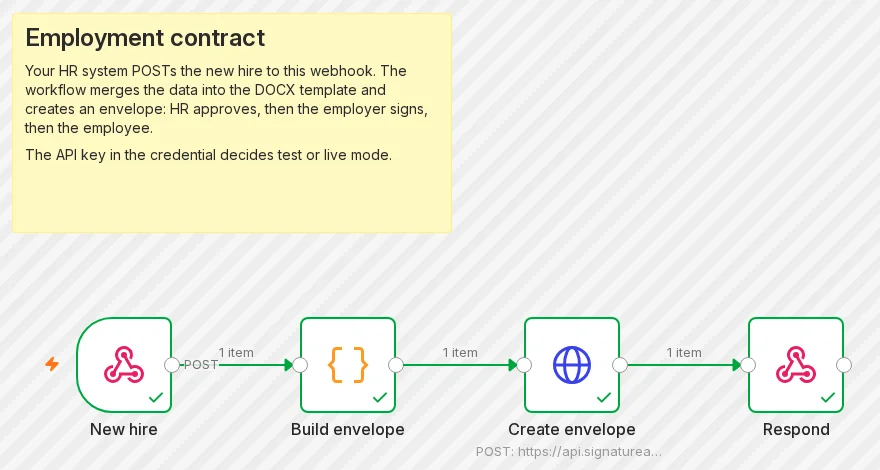
- New hire (Webhook) receives the request.
- Build envelope (Code) turns the request into an envelope body.
- Create envelope (HTTP Request) sends it to
POST /v1/envelopes. - Respond (Respond to Webhook) answers the caller with the envelope id, or with the API’s error.
For the finished workflow, download employment-contract.json from GitHub and import it into n8n.
Build it
New hire: the Webhook node
Add a Webhook node. Set HTTP Method to POST, Path to employment-contract, and Respond to Using ‘Respond to Webhook’ Node.
Build envelope: a Code node
Add a Code node in Run Once for All Items mode, with this JavaScript. Replace REPLACE_WITH_YOUR_TEMPLATE_URL with your stored template’s URL, and the constants with your company’s details.
// Builds the envelope from the request your HR system sends to this webhook.
// Settings: replace with your own values.
const TEMPLATE_URL = 'REPLACE_WITH_YOUR_TEMPLATE_URL'; // the stored employment-contract template
const EMPLOYER = { name: 'Acme Corp', address: '100 Example Street, Springfield' };
const HR_APPROVER = { name: 'Alex Chen', email: 'alex.chen@example.com' };
const EMPLOYER_SIGNER = { name: 'John Smith', email: 'john.smith@example.com', title: 'Head of Operations' };

const input = $input.first().json.body;
if (!input?.employee?.name || !input?.employee?.email) {
  throw new Error('The request needs employee.name and employee.email');
}

const envelope = {
  title: `Employment contract: ${input.employee.name}`,
  message: 'Please review and sign your employment contract.',
  routing: 'sequential', // recipients act in array order: HR, then employer, then employee
  metadata: input.reference ? { hr_reference: String(input.reference) } : {},
  documents: [
    {
      key: 'contract',
      url: TEMPLATE_URL,
      format: 'docx',
      data: {
        city: 'Springfield',
        contractDate: new Date().toISOString().slice(0, 10),
        employer: { ...EMPLOYER, signatory: EMPLOYER_SIGNER.name, signatoryTitle: EMPLOYER_SIGNER.title },
        employee: { name: input.employee.name, address: input.employee.address ?? '' },
        startDate: input.start_date,
        jobTitle: input.job_title,
        hasProbation: Boolean(input.has_probation),
        probationMonths: String(input.probation_months ?? '3'),
        weeklyHours: String(input.weekly_hours ?? '40'),
        currency: input.currency ?? 'USD',
        salary: String(input.salary),
        vacationDays: String(input.vacation_days ?? '25'),
        governingLaw: 'the State of Delaware',
      },
      places: [
        { key: 'employer_signs_here', type: 'signature', recipient_key: 'employer' },
        { key: 'employee_signs_here', type: 'signature', recipient_key: 'employee' },
      ],
    },
  ],
  recipients: [
    { type: 'approver', key: 'hr', ...HR_APPROVER },
    { type: 'signer', key: 'employer', name: EMPLOYER_SIGNER.name, email: EMPLOYER_SIGNER.email },
    { type: 'signer', key: 'employee', name: input.employee.name, email: input.employee.email },
  ],
};

return [{ json: { envelope } }];
The data keys match the template’s merge fields, and the two places match its placeholders [[employer_signs_here]] and [[employee_signs_here]]. The approver needs no place: approvers review and approve without signing. With routing: "sequential", the employer is notified only after HR approves, and the employee only after the employer signs.
Create envelope: the HTTP Request node
Add an HTTP Request node:
| Setting | Value |
|---|---|
| Method | POST |
| URL | https://api.signatureapi.com/v1/envelopes |
| Authentication | Generic Credential Type, Generic Auth Type Header Auth, credential SignatureAPI test key |
| Send Body | On, Body Content Type JSON, Specify Body Using JSON |
| JSON | {{ JSON.stringify($json.envelope) }} |
| Options > Response | Include Response Headers and Status on, Never Error on, Response Format JSON |
The response options keep the workflow running when the API refuses the request, so the next node can return the error.
Respond: the Respond to Webhook node
Add a Respond to Webhook node. Set Respond With to JSON, and add the Response Code option.
- Response Body:
{{ JSON.stringify($json.statusCode === 201 ? { envelope_id: $json.body.id, status: $json.body.status } : $json.body) }} - Response Code:
{{ $json.statusCode === 201 ? 201 : 502 }}
Activate the workflow
Activate (publish) the workflow so its production URL https://<your-n8n>/webhook/employment-contract accepts requests.
Try it
curl -X POST https://<your-n8n>/webhook/employment-contract \
  -H 'Content-Type: application/json' \
  -d '{
    "reference": "HR-1042",
    "employee": { "name": "Maria Garcia", "email": "maria.garcia@example.com", "address": "12 Sample Lane, Springfield" },
    "job_title": "Customer Success Manager",
    "start_date": "2026-12-01",
    "salary": "72,000",
    "currency": "USD",
    "has_probation": true,
    "probation_months": 3,
    "weekly_hours": 40,
    "vacation_days": 25
}'{ "envelope_id": "eb4cf433-a8af-4161-b37b-7ef57d423e56", "status": "processing" }A few seconds later the envelope is in_progress. The HR approver has the request, and both signers wait their turn. has_probation chooses the template’s probation clause. In test mode no email reaches anyone. Read the emails in the Dashboard’s Emails view.
Make it yours
- Your template. Change the
dataobject to match your template’s merge fields. See Document templates. - Your HR system’s fields. The Code node reads
employee,job_title,start_dateand the rest from the request body. Rename them to match what your system sends. - The signed copy. Add the signed PDF workflow to store the contract when everyone has signed.
data.envelope_metadata.hr_referencecomes back in every event for this envelope.