
Signing Workers
Connection checks
What each signing worker check tests, the message it shows when it fails, and how to fix it
Private beta. Qualified signatures are available on request. Request access and we enable them for your account.
When you connect or replace a signing worker, or select Run Checks, SignatureAPI runs five checks against the worker. None of them signs anything. When you connect or replace, nothing is saved unless every check passes.
| Check | Passes when |
|---|---|
| Worker URL | The URL uses HTTPS on port 443 and resolves to public addresses only |
| Health | GET /v1/health answers 200 with ok or degraded |
| Connection token | The health response lists your account’s connection token for this mode |
| Request authentication | The worker refuses a token meant for another worker, and verifies a valid one |
| Static certificate | Only when you gave one: the certificate is readable, current and uses supported algorithms |
Each check shows Passed, Failed or Skipped. If the worker URL, health or connection token check fails, the later checks are skipped. The whole run has 20 seconds. If it runs out, the check in progress says “The checks ran out of time (20 seconds). Run them again.”
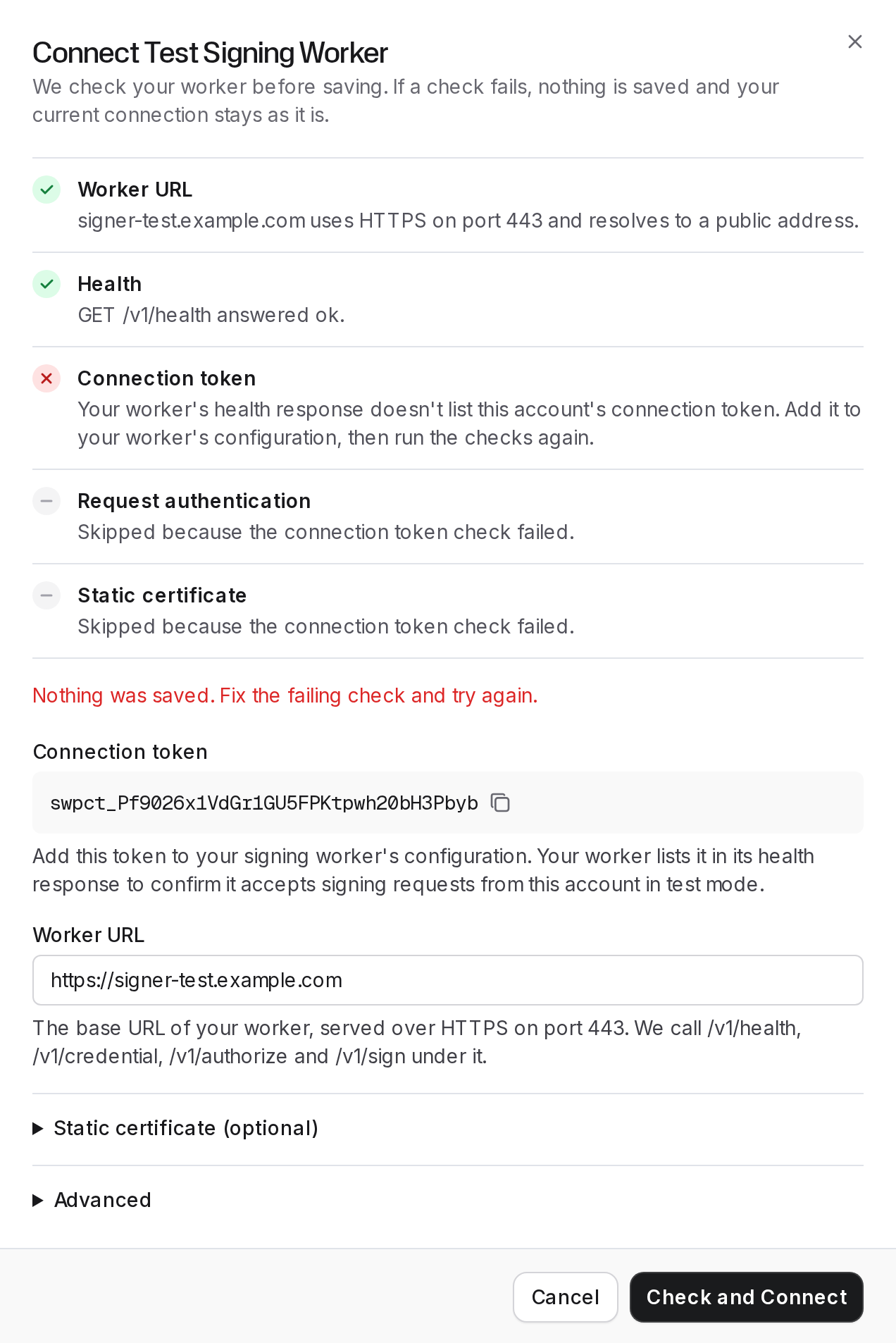
A refused connect lists every check with its result. Here the worker doesn’t list the account’s connection token yet, so the later checks are skipped and nothing is saved:
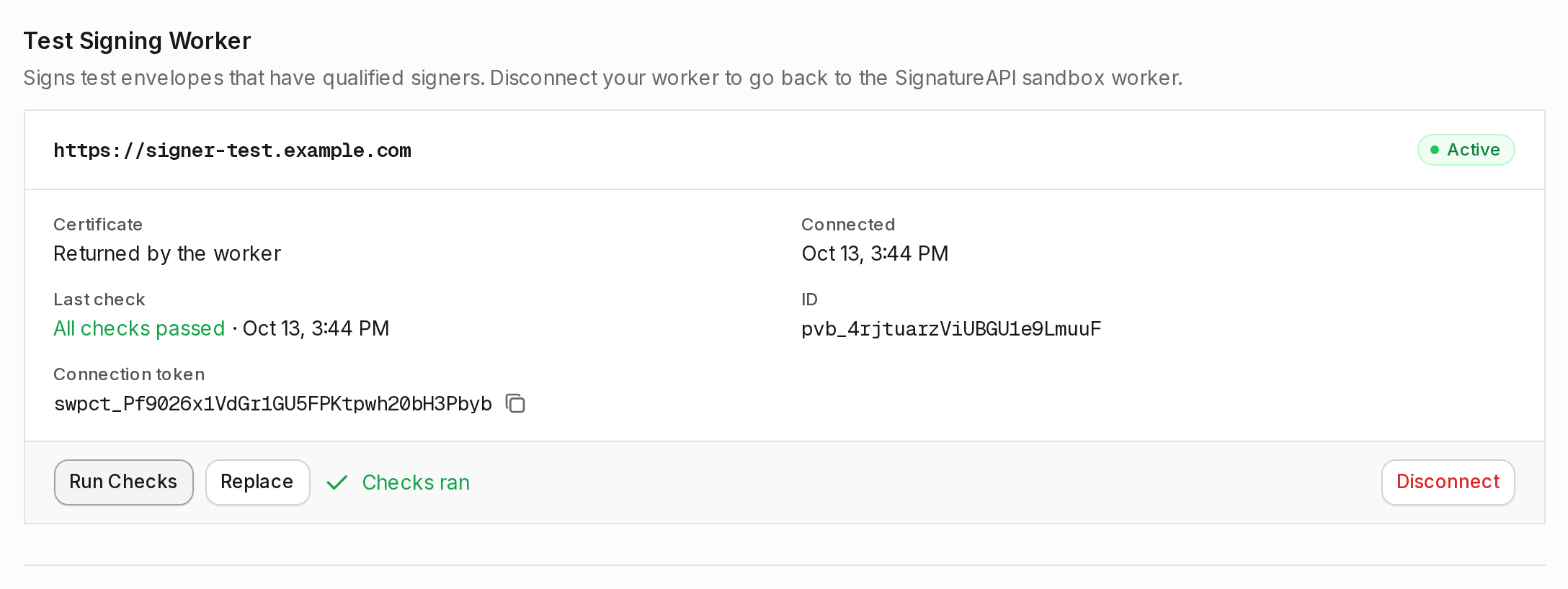
On a connected worker, Run Checks shows Checks ran and records the result under Last check. When a check fails, the card lists the failing checks:
In the messages below, <…> stands for a value from your worker or your URL.
Worker URL
The URL must use https on port 443, with no user name, password, query string or fragment. Every address its hostname resolves to must be public: not private, loopback, link-local or multicast. The DNS lookup has 5 seconds.
| Message | Fix |
|---|---|
Enter the full base URL of your worker, for example https://signer.example.com. | Enter the URL with its scheme. |
Remove the query string or fragment. Enter only the base URL of your worker. | Drop everything from ? or # on. |
<reason>. Workers must be served over HTTPS on port 443 from a public address. | Use https, drop any port other than 443, and serve the worker from a public address. |
<hostname> did not resolve within 5 seconds. Check the hostname and its DNS records. | Fix the hostname or its DNS records. |
<reason>. Check the hostname and its DNS records. | The hostname didn’t resolve. Fix it or its DNS records. |
Health
SignatureAPI calls GET /v1/health once, with 5 seconds to answer.
| Message | Fix |
|---|---|
GET /v1/health answered <status> … It must answer 200 with {"status":"ok"} or {"status":"degraded"}. | Serve the endpoint without authentication or redirects, and answer 200 with a JSON status of ok or degraded. |
GET /v1/health did not answer within 5 seconds. | Answer faster. Don’t wait on slow provider calls. |
GET /v1/health could not be reached: <reason>. | Check that the worker is running and that its TLS certificate comes from a public certificate authority. |
Connection token
The health response must list your account’s connection token for this mode in connection_tokens. This is how the worker’s owner confirms that the worker accepts signing requests from your account.
| Message | Fix |
|---|---|
Your worker's health response doesn't list this account's connection token. Add it to your worker's configuration, then run the checks again. | Copy the Connection token from the connect dialog or the worker’s card, and have the worker’s owner add it. Test and live tokens differ. |
This check is skipped when you connect the SignatureAPI sandbox worker in test mode. The result reads: Not needed: this is the SignatureAPI sandbox worker, which accepts every account.
Request authentication
This check proves that the worker accepts SignatureAPI’s requests and refuses everyone else’s. It sends two POST /v1/credential requests with a placeholder signer. Neither carries an Idempotency-Key, so a correct worker refuses both before acting. This happens even when you gave a static certificate.
- A token for another worker. It is correctly signed, but its
audis your URL followed by/not-this-worker. The worker must answer401. - A valid token. The worker verifies it, then refuses the request with
400because theIdempotency-Keyis missing. Theerror_descriptionmust containmissing Idempotency-Key, in any letter case. Whenerror_descriptionis absent, SignatureAPI readserror.
Both requests share 10 seconds.
| Message | Fix |
|---|---|
Your worker accepted a request signed for a different audience (it answered <status> instead of 401). Verify aud, signature, iss and exp before reading the request. | Verify the token before anything else. See Verify a request. |
Your worker must refuse a request signed for a different audience with 401, but it answered <status>. … | Answer 401 to a token that fails verification. |
Your worker rejected our signed request: <reason>. Accept tokens whose aud is exactly <URL> … | Your worker refused a valid token. Check the claim it names: usually aud, which must equal the URL you entered, or iss, which must be https://api.signatureapi.com. |
Your worker rejected our signed request: <reason>. Add this account's connection token to your worker's configuration. | Have the worker’s owner add your connection token for this mode. |
Your worker processed a request without an Idempotency-Key. Workers must refuse such requests … | Refuse a request without an Idempotency-Key with 400. |
POST /v1/credential answered <status>: <reason>. A request without an Idempotency-Key must be refused with 400. | Answer 400 with missing Idempotency-Key in error_description. |
Static certificate
Runs only when you give a static certificate. It checks that every certificate in the chain is readable, that the signer certificate hasn’t expired, and that every OID you entered is supported.
| Message | Fix |
|---|---|
Provide both the certificate chain and the key algorithm OIDs, or neither. | Fill in both fields, or clear both. |
The certificate chain holds no PEM certificate. | Paste PEM blocks, each between -----BEGIN CERTIFICATE----- and -----END CERTIFICATE-----. |
Certificate <n> in the chain could not be read as X.509. | Replace that certificate with a valid one. |
The signer certificate expired on <date>. | Paste the current certificate, signer certificate first. |
"<value>" is not a well-formed OID. | Use dotted OIDs, such as 1.2.840.10045.4.3.2. |
<OID> is not a supported key algorithm. Supported: … | Use an OID from the supported algorithms. |