
Signing Workers
Build and test a signing worker
The parts every signing worker shares, how to test one against the sandbox worker, and the checklist before you go live
Private beta. Qualified signatures are available on request. Request access and we enable them for your account. SWP/1 is in beta and may change.
Build a signing worker when nobody runs one for your provider yet. If your provider already runs one, skip to Connect a signing worker.
Before you start
- Qualified signatures enabled on your SignatureAPI account. Test mode works right away with the sandbox worker.
- A provider account with API access, ideally with a test environment.
- A public HTTPS host on port 443, with a certificate from a public certificate authority.
- A store for idempotency outcomes and seen token IDs, shared by all instances.
1. Choose your model
Answer three questions about your provider: does the signer already have a certificate, when does the provider identify them, and does its signing call return a bare value or a finished CMS? Choose your provider’s model turns the answers into a signature format and the calls your worker pauses.
Then follow the closest recipe for the provider calls behind each operation:
| Recipe | Provider | Format | Pauses |
|---|---|---|---|
| CSC remote certificate | Long-term certificate behind the CSC API, approval with an OTP | raw | authorize, redirect |
| One-shot certificate | Identifies, issues a certificate for one signature, returns a CMS | cms | authorize, redirect |
| App approval | Long-term certificate, approval in the provider’s app | raw or cms | authorize, poll |
2. Build the endpoints
Serve the health check
Answer GET /v1/health without authentication, and list the connection tokens you accept:
Authenticate every POST
Verify the token, body hash and connection token first, then refuse a missing Idempotency-Key with 400. See Verify a request for the order and a Node.js example.
Make every operation idempotent
Wrap each operation in one handler keyed by the Idempotency-Key:
conflict(message) returns { refusal: { error: "idempotency_conflict", error_description: message } }, which the handler in the next step answers with 409. The rules are in Idempotency.
Implement credential, authorize and sign
Follow your recipe and each endpoint page. Every worker has the same skeleton:
Two details trip up most first versions of a raw sign:
- Don't hash again. The digest is already a hash.
- Return DER for ECDSA, not the compact
r‖sform many APIs return.
For cms, return the provider's CMS and the certificate chain, signer first. Leave out CRLs, OCSP responses and timestamps: SignatureAPI adds its own.
3. Configure connection tokens
Your worker accepts only the accounts whose connection tokens you list. For each account you serve, including your own, open Connect Test Worker or Connect Live Worker (or a connected worker’s card), copy the Connection token, and add it to your worker’s configuration.
4. Test in test mode
Try the sandbox worker first
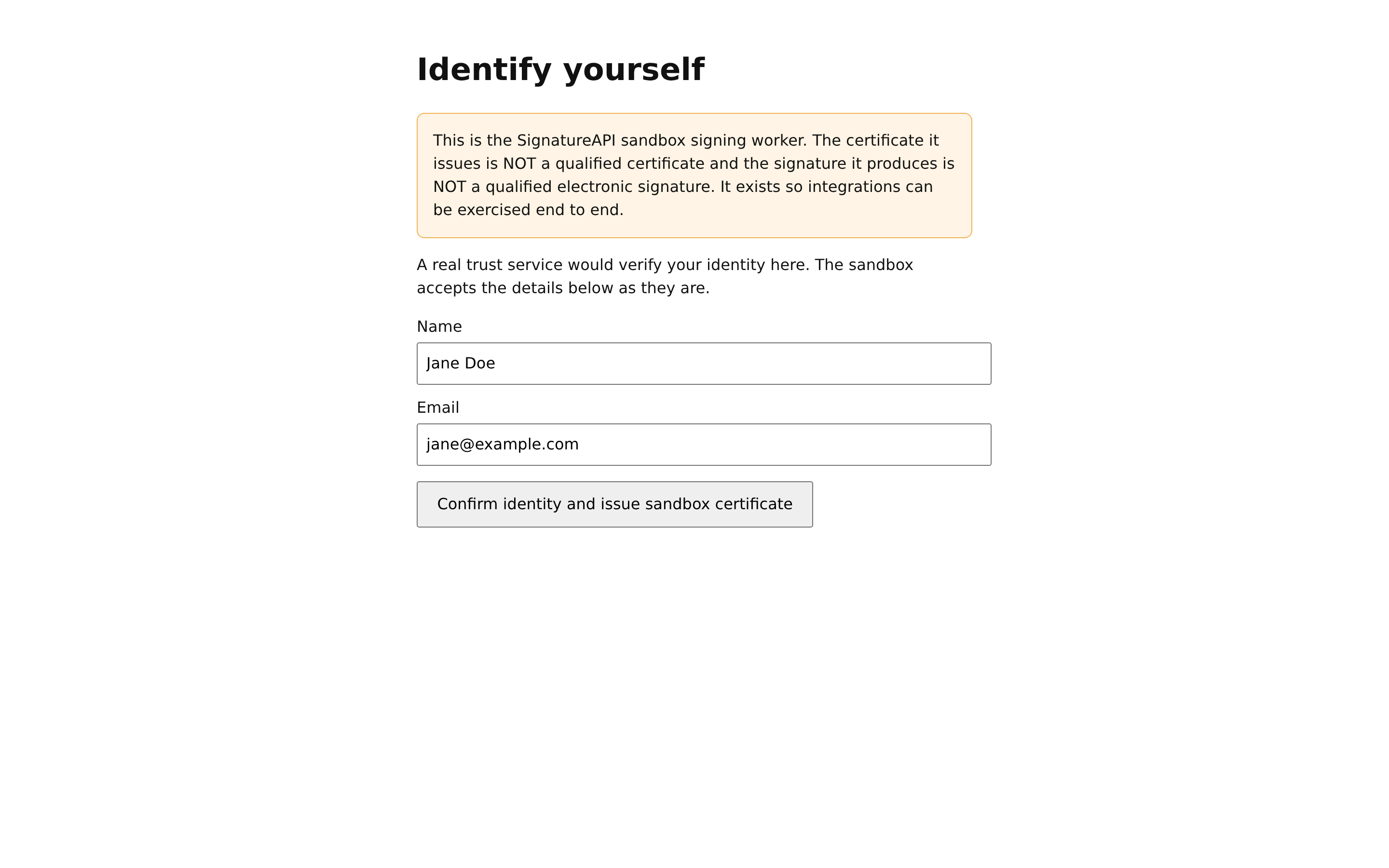
Before you connect anything, send a test envelope with a qualified signer, as in the Quickstart. The sandbox worker at https://sandbox-signer.signatureapi.com signs it, and it's a working SWP/1 worker you can watch from the outside:
credentialpauses with anaction_urlto its Identify yourself page. On the resumed call, it issues a short-lived ECDSA P-256 certificate and returns it, inraw.authorizepauses with anaction_urlto its Authorize your signature page, which lists the digest'slabel.signreturns a DER-encoded ECDSA signature.
It pauses twice on purpose, to show both ceremony screens. Your worker pauses only where your provider needs the signer. See Choose your provider's model.
Connect your worker for test mode
Connect your worker with Connect Test Worker. Fix any failing connection check.
Sign a test envelope
Send the same test envelope. Your worker receives credential, authorize and sign. Check the deliverable's signature in a PDF signature validator.
Also test the paths that are easy to miss:
| Test | Expected |
|---|---|
| The signer refuses at the provider | Your worker answers failed with access_denied, or redirects to callback_url with error=access_denied. The ceremony shows your error_description and Try again. |
| The signer walks away | After the authorization timeout, the session fails with authorization window expired. |
| The browser comes back twice | The second callback has no effect, because your code is single-use. |
| A poll arrives while the signer decides | Your worker answers from the provider’s current state and doesn’t start the act again. |
A repeated sign | In your own tests, the second call with the same Idempotency-Key returns the stored signatures without calling your provider. |
| A token for another worker | 401 with invalid_token. The connection checks test this for you. |
cms only: the largest real signature | It fits your max_signature_size. |
Disconnect your test worker to go back to the sandbox worker for comparison.
5. Go live
When every test passes:
- Switch your worker to your provider’s production environment, with qualified certificates.
- Add the account’s live connection token to your worker.
- Connect the worker with Connect Live Worker.
- Send a live envelope and check the signature in a validator. The signer should now show as trusted.
See Go live for the account requirements.
Go-live checklist
Check every line before you connect for live mode.
- Serve
POST /v1/credential,/v1/authorize,/v1/signandGET /v1/healthon a public HTTPS URL, port 443, without redirects. - List the connection tokens you accept in
/v1/health, and refuse requests carrying any other. - Verify
ES256,iss,aud,exp,swp.operation,swp.sessionandswp.body_sha256. Remember eachjtiuntilexpplus your clock tolerance. - Refuse a request without an
Idempotency-Keywith400, after verifying its token. - Answer every operation with
200andcompleted,pendingorfailed. - Return the full chain, signer certificate first, with honest
key_algo_oidsandexpires_at. Forcms, return the chain insign, and incredentialtoo if you have it. - Declare
"signature_format": "cms"if your provider returns a complete CMS, with amax_signature_sizethat covers its largest output. - In
key_algo_oids, list a SHA-256 algorithm before any other full signature algorithm. - Pause
credentialorauthorizeonly where your provider needs the signer, and setexpires_aton apendinganswer when the provider’s request expires sooner than the connection’s timeout. - Answer each poll from the provider’s current state. Never send a second push for one session.
- Show each digest’s
labelon any approval screen you host. - End a redirect step at
callback_url, with a single-usecode. Never answer a request carryingcallback.codewithpending. - Follow the idempotency rules. Never sign twice for one key.
- Sign the right input and return the right encoding. For
cms, meet the CMS requirements. - Use only the listed error codes, or
x_-prefixed ones. - Write
error_descriptionfor the signer. The ceremony shows it when the session fails. - Never log request bodies.