

Glossary
What is an audit trail in electronic signatures?
An audit trail records who signed, how they were authenticated and when each step happened. See what the SignatureAPI audit log holds and how it is protected.
An audit trail is the record of a signing process: who received the documents, how each person was authenticated, what they agreed to, when they signed, and when the transaction finished. It’s the evidence you show when someone later asks “who signed this, and how do you know?”
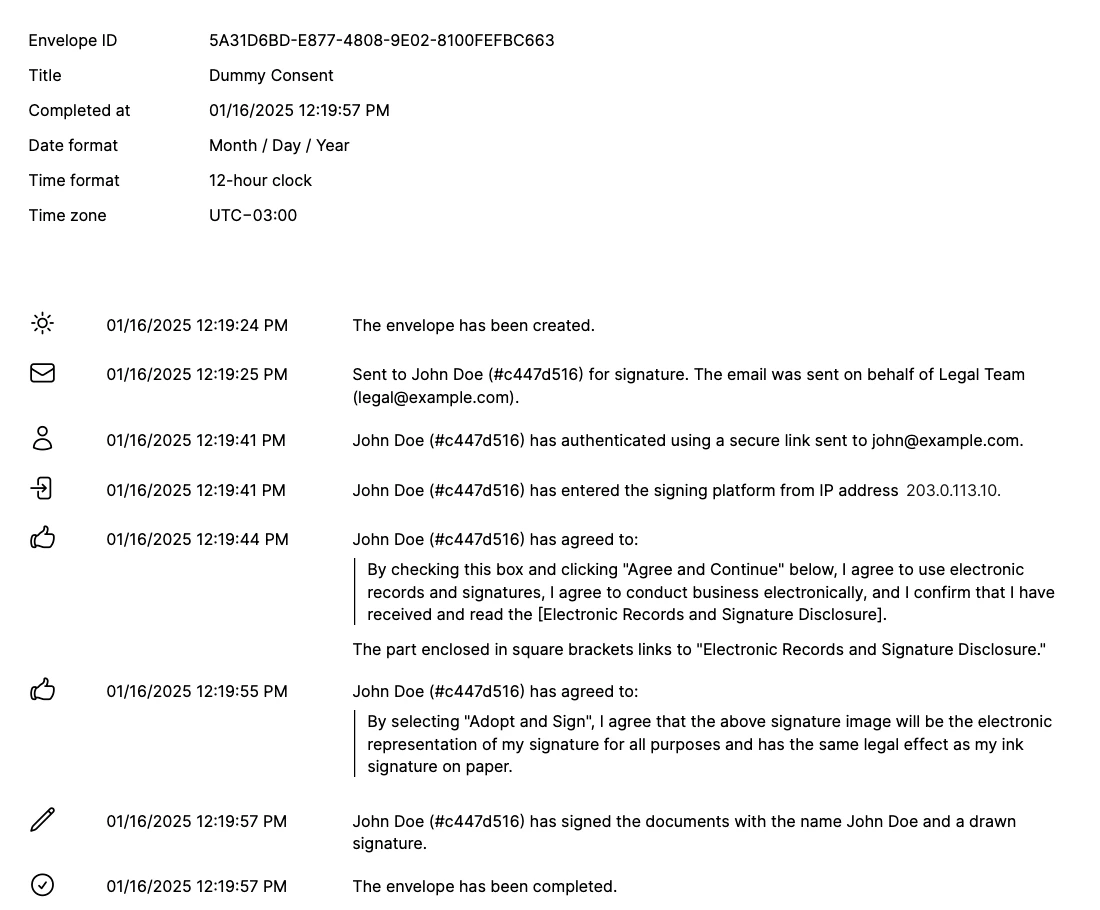
In SignatureAPI, the audit trail is the audit log: a set of pages at the end of the standard deliverable, the signed PDF that SignatureAPI builds when an envelope completes.
What the audit log records
The audit log starts with the envelope details: the envelope ID, its title, when it completed, and the date format, time format and time zone used for every timestamp in the log.
Then it lists one line per event, in order, each with a timestamp:
- Creation. The envelope was created.
- Sending. The signing request was sent to the recipient, on behalf of the sender named on the envelope.
- Authentication. How the recipient proved who they are: a secure link or a code sent to their email, or your own custom authentication, with the provider and data you supplied.
- Access. The recipient entered the signing ceremony, with the IP address they came from.
- Consent. The exact text the recipient agreed to, quoted in full, such as the agreement to use electronic records and signatures.
- Signing. The recipient signed or initialed, with the name they typed and whether they drew a signature.
- Automatic signatures. For an automatic signer, the mandate you provided.
- Completion. The envelope was completed.
Approvers and preparers don’t appear in the audit log: it records the signers.
How the audit log is protected
The audit log is part of the deliverable PDF, and SignatureAPI seals the whole PDF with a cryptographic signature and a trusted timestamp. If anyone changes a page afterwards, the audit log included, PDF readers report that the signature is no longer valid. See Document hash for how that works and Verify a deliverable to check one yourself.
Language and time zone
The audit log’s labels come in the envelope’s language, and its timestamps use the envelope’s time zone and timestamp format. You can override all three for the deliverable alone. They don’t change the signed documents.
When there’s no audit log
- A simple deliverable contains only the signed documents. You can still create a standard deliverable for the same envelope later.
- An envelope with a qualified signer gets its deliverable without an audit log. Each qualified signature sits in the PDF as a PAdES signature with the signer’s certificate, and PDF readers list it in their signature panel.
Related
- Standard deliverable: download a sample with an audit log.
- Are electronic signatures legal?: why records like this matter.
- Glossary: other terms.