
Platforms
iOS
Embed the SignatureAPI signing ceremony in an iOS app with WKWebView
Your iOS app shows the signing ceremony in a WKWebView and learns how it ended without leaving the app.
The demo’s iOS app signing a test document inside the app, then showing its own result screen:
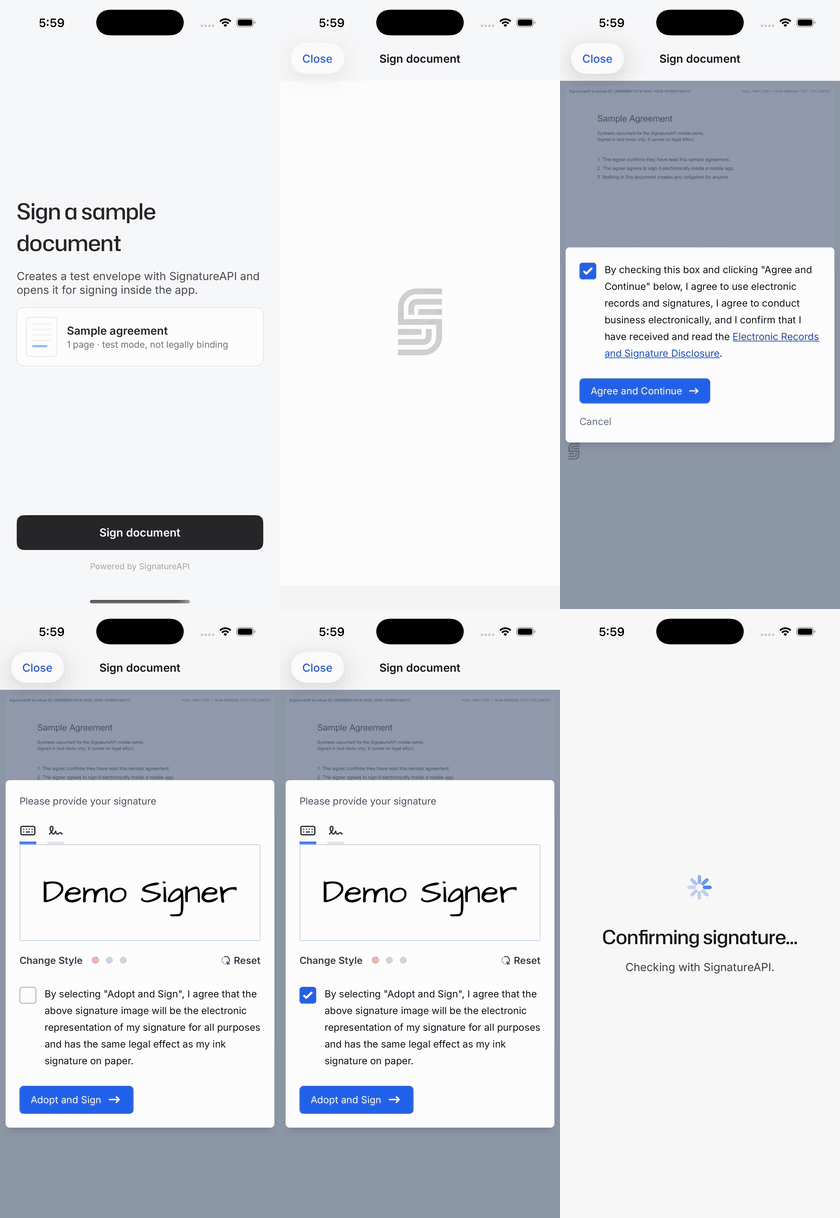
The samples need iOS 17 or later, the demo’s deployment target.
How it works
sequenceDiagram
    participant App as iOS app
    participant Server as Your server
    participant API as SignatureAPI
    participant View as WKWebView
    App->>Server: Ask for the signing link
    Server->>API: Create the envelope with custom authentication
    API-->>Server: Ceremony URL
    Server-->>App: Ceremony URL
    App->>View: Load the URL with embedded=true and event_delivery=redirect
    Note over View: The recipient signs
    View->>App: Navigate to signatureapi-message://ceremony.completed
    App->>View: Cancel the navigation and close
    App->>Server: Did the recipient sign?
    Server->>API: Read the envelope
    API-->>Server: Recipient status is completed
    Server-->>App: Confirmed, show the result screen
Your server creates the ceremony
Your server creates the envelope with custom authentication. SignatureAPI returns the ceremony URL to your server instead of emailing it. Your server passes the URL to the app.
The app loads the ceremony
The app appends embedded=true&event_delivery=redirect to the URL and loads it as the WKWebView's page.
The ceremony reports how it ended
When the ceremony ends, it navigates to a signatureapi-message:// URL. Your navigation delegate cancels that navigation and reads the event from the URL.
Your server confirms the outcome
The app asks your server whether the recipient really signed before it shows a result.
The ceremony is the WKWebView’s top-level page, so you don’t need embeddable_in or a host page. This page uses event_delivery=redirect, the recommended delivery, which needs no JavaScript bridge either. To receive the event as a JavaScript message instead, see Use message delivery instead.
Create the ceremony on your server
Create the envelope on your server and give the signer a ceremony with custom authentication:
// POST https://api.signatureapi.com/v1/envelopes
// X-API-Key: key_test_...
// Content-Type: application/json

{
  "title": "Sample agreement",
  "documents": [ /* ... */ ],
  "recipients": [
    {
      "type": "signer",
      "key": "signer",
      "name": "Jane Doe",
      "email": "jane.doe@example.com",
      "delivery_type": "none",
      "ceremony": {
        "authentication": [
          {
            "type": "custom",
            "provider": "YourApp",
            "data": {
              "Session ID": "a4f9e8b2-7c1d-4b2d-9a4b-e0c5d6f7a1b3",
              "Authenticated At": "2025-12-31T23:59:59Z"
            }
          }
        ],
        "redirect_delay": 0
      }
    }
  ]
}customauthentication makes SignatureAPI return the ceremony URL instead of emailing it. Put references to your own login session indata; they appear in the audit log.delivery_type: "none"stops SignatureAPI from emailing the signed deliverable to the signer. Set it toemailif you want them to get a copy.redirect_delay: 0is optional. It hands control back to the app as soon as the signer finishes, so the app can show its own result screen. Without it, the ceremony shows its own result page for 3 seconds.- Leave out
redirect_url. Embedded ceremonies ignore it. - Leave out
embeddable_in. A top-levelWKWebViewdoesn’t need it.
When the envelope leaves the processing status, read it and return the signer’s ceremony.url to the app:
// GET https://api.signatureapi.com/v1/envelopes/{envelope_id}
// X-API-Key: key_test_...

// HTTP/1.1 200 OK
{
  "id": "abcdef12-3456-7890-1234-abcdef123456",
  "status": "in_progress",
  "recipients": [
    {
      "type": "signer",
      "key": "signer",
      "ceremony": {
        "url": "https://sign.signatureapi.com/en/start?token=eyJhbGcNiIsInR..."
      }
    }
  ]
}The ceremony URL is a bearer credential: anyone holding it can sign. Don’t log it and don’t store it on the device. To resume later, ask your server for the current URL. Every read of the envelope returns a new URL for the same ceremony.
Load the ceremony
CeremonyLink turns the URL from your server into the URL the WebView loads. It adds embedded=true and event_delivery=redirect:
import Foundation

/// Turns the ceremony URL from the server into the URL the WebView loads.
enum CeremonyLink {
    /// `embedded=true` adapts the ceremony UI; `event_delivery=redirect` makes it
    /// report its ending as a `signatureapi-message://` navigation.
    static func embedded(_ ceremonyURL: URL) -> URL {
        guard var components = URLComponents(url: ceremonyURL, resolvingAgainstBaseURL: false) else { return ceremonyURL }
        var items = (components.queryItems ?? []).filter { $0.name != "embedded" && $0.name != "event_delivery" }
        items.append(URLQueryItem(name: "embedded", value: "true"))
        items.append(URLQueryItem(name: "event_delivery", value: "redirect"))
        components.queryItems = items
        return components.url ?? ceremonyURL
    }
}
CeremonyWebView wraps a WKWebView for SwiftUI. It loads the ceremony as the page and passes each event to onEvent:
import SwiftUI
import WebKit

/// Shows a SignatureAPI ceremony as the WKWebView's page and reports how it ended.
struct CeremonyWebView: UIViewRepresentable {
    let ceremonyURL: URL
    let onEvent: (CeremonyEvent) -> Void

    func makeCoordinator() -> Coordinator {
        Coordinator(onEvent: onEvent)
    }

    func makeUIView(context: Context) -> WKWebView {
        let webView = WKWebView(frame: .zero, configuration: WKWebViewConfiguration())
        webView.navigationDelegate = context.coordinator
        webView.allowsBackForwardNavigationGestures = false
        #if DEBUG
        webView.isInspectable = true
        #endif
        context.coordinator.url = CeremonyLink.embedded(ceremonyURL)
        webView.load(URLRequest(url: context.coordinator.url!))
        return webView
    }

    func updateUIView(_ webView: WKWebView, context: Context) {}

    static func dismantleUIView(_ webView: WKWebView, coordinator: Coordinator) {
        webView.stopLoading()
    }

    final class Coordinator: NSObject, WKNavigationDelegate {
        private let onEvent: (CeremonyEvent) -> Void
        fileprivate var url: URL?
        private var ended = false

        init(onEvent: @escaping (CeremonyEvent) -> Void) {
            self.onEvent = onEvent
        }

        func webView(_ webView: WKWebView, decidePolicyFor action: WKNavigationAction, decisionHandler: @escaping @MainActor (WKNavigationActionPolicy) -> Void) {
            guard let url = action.request.url else { return decisionHandler(.cancel) }

            if let event = CeremonyEvent(url: url) {
                decisionHandler(.cancel)
                guard !ended else { return }
                ended = true
                onEvent(event)
                return
            }

            // Links that ask for a new window, such as "Powered by SignatureAPI", open in Safari.
            if action.targetFrame == nil {
                decisionHandler(.cancel)
                UIApplication.shared.open(url)
                return
            }

            decisionHandler(.allow)
        }

        func webViewWebContentProcessDidTerminate(_ webView: WKWebView) {
            // iOS may kill the web process under memory pressure, typically while the
            // app is in the background. Reload the same link: it stays valid.
            if let url { webView.load(URLRequest(url: url)) }
        }
    }
}
Show it full screen under a bar your app owns:
NavigationStack {
    CeremonyWebView(ceremonyURL: ceremony.url) { event in
        Task { await flow.ceremonyEnded(with: event, envelopeId: ceremony.envelopeId) }
    }
    .ignoresSafeArea(.container, edges: .bottom)
    .navigationTitle("Sign document")
    .navigationBarTitleDisplayMode(.inline)
    .toolbar {
        ToolbarItem(placement: .topBarLeading) {
            Button("Close") { flow.closeCeremony() }
        }
    }
}
.interactiveDismissDisabled()
To hide the ceremony’s own Cancel controls, for example because your app has its own Close button, also append allow_cancel=false. See Disable Cancel.
Receive the result
With event_delivery=redirect, the ceremony ends by navigating to a signatureapi-message:// URL:
- The URL’s host is the event type, such as
ceremony.completed. - On
ceremony.failed, the query carrieserror_typeanderror_message, form-encoded (+is a space).
signatureapi-message://ceremony.failed/?error_type=unauthorized&error_message=The+link+is+no+longer+valid.This is a client-side navigation, not an HTTP redirect. No request reaches the network, so HTTP-layer interception such as URLProtocol or a proxy never sees it. Catch it in webView(_:decidePolicyFor:decisionHandler:), as CeremonyWebView does, and cancel it.
CeremonyEvent parses the URL:
import Foundation

/// A terminal event from an embedded ceremony.
///
/// With `event_delivery=redirect` the ceremony reports how it ended by
/// navigating to `signatureapi-message://<type>/?error_type=…&error_message=…`.
/// Branch on `type` and `errorType` only: `errorMessage` is for logs.
struct CeremonyEvent: Equatable, Sendable {
    static let scheme = "signatureapi-message"

    let type: String
    let errorType: String?
    let errorMessage: String?

    init?(url: URL) {
        guard url.scheme == Self.scheme, let host = url.host(), !host.isEmpty,
              var components = URLComponents(url: url, resolvingAgainstBaseURL: false)
        else { return nil }
        // The query is form-encoded: "+" means a space.
        components.percentEncodedQuery = components.percentEncodedQuery?.replacingOccurrences(of: "+", with: "%20")
        let items = components.queryItems ?? []
        type = host
        errorType = items.first { $0.name == "error_type" }?.value
        errorMessage = items.first { $0.name == "error_message" }?.value
    }
}
See Event types for every event and Event delivery for the delivery modes.
Handle each outcome
Branch on the event type, and on error_type for failures. This excerpt comes from the demo’s SigningFlow, the observable model behind its screens. phase decides what the app shows:
import Foundation
import Observation

@Observable
final class SigningFlow {
    enum Phase: Equatable {
        case ready
        case preparing
        case signing(Ceremony)
        case confirming
        case finished(Ending)
    }

    struct Ceremony: Identifiable, Equatable {
        let id = UUID()
        let envelopeId: String
        let url: URL
    }

    enum Ending: Equatable {
        case signed
        case canceled
        case declined
        case couldNotOpen(String)
        case notConfirmed(String)
    }

    private(set) var phase = Phase.ready

    private let makeClient: () throws -> DemoServerClient

    // ...

    func ceremonyEnded(with event: CeremonyEvent, envelopeId: String) async {
        switch event.type {
        case "ceremony.completed":
            phase = .confirming
            phase = .finished(await confirmSignature(envelopeId: envelopeId))
        case "ceremony.canceled":
            phase = .finished(.canceled)
        case "ceremony.declined":
            phase = .finished(.declined)
        default:
            phase = .finished(.couldNotOpen(Self.explanation(for: event)))
        }
    }

    /// `ceremony.completed` is a UI signal. The envelope on the server is the
    /// proof, and its status can take a moment to catch up.
    private func confirmSignature(envelopeId: String) async -> Ending {
        do {
            let client = try makeClient()
            for _ in 0..<12 {
                if try await client.envelope(envelopeId).signerCompleted { return .signed }
                try await Task.sleep(for: .seconds(1.5))
            }
            return .notConfirmed("SignatureAPI hasn’t confirmed the signature yet. It usually takes a few seconds.")
        } catch {
            return .notConfirmed(error.localizedDescription)
        }
    }

    private static func explanation(for event: CeremonyEvent) -> String {
        switch event.errorType {
        case "unauthorized": "This signing link is no longer valid. Start again to get a new one."
        case "already_completed": "You already finished this document."
        case "not_available": "This document is no longer available for signing."
        default: "The signing session couldn’t be completed. Start again to get a new link."
        }
    }
}
DemoServerClient is the demo’s client for your server, never for SignatureAPI. client.envelope(id) calls your server, which reads the envelope from SignatureAPI (GET /v1/envelopes/{id}). signerCompleted is true when the signer’s status is completed.
ceremony.completed: the signer finished. Treat it as a UI signal, not proof. Ask your server to read the envelope or recipient before you show “Signed” or act on it. See Confirm the outcome on your server.ceremony.canceled: the signer tapped Cancel. The envelope stays open, and your server can return a URL to resume later.ceremony.declined: an approver tapped Reject.ceremony.failed: the ceremony couldn’t be used. Branch onerror_typeand treat an unknown value as a generic failure. The ceremony already shows the signer a translated message.error_messageis a fixed English description for your logs: don’t show it to signers and don’t branch on it. See Error types.- Your own Close button: the ceremony sends no event. Treat it as canceled in the app.
Use message delivery instead
event_delivery=redirect is the recommended delivery. If you’d rather receive the event as a JavaScript message, keep loading the ceremony as the WKWebView’s page and use event_delivery=message instead. The ceremony is still the top-level page, so you still don’t need embeddable_in.
When the ceremony ends, it calls parent.postMessage(payload, "*"). As the top-level page, parent is the page’s own window, so the page receives its own message: { "type": "ceremony.completed" }, plus error_type and error_message on failure. A script that runs at document start forwards it to Swift.
The bridge script
This script is the security check. It forwards a message only when it comes from the ceremony’s origin and from this very window. Other messages go out as "kind": "rejected", which the app ignores. Copy it unchanged:
(function () {
  var CEREMONY_ORIGIN = "https://sign.signatureapi.com";

  function bridge() {
    var handlers = window.webkit && window.webkit.messageHandlers;
    return (handlers && handlers.signatureapiBridge) || window.signatureapiBridge;
  }

  window.addEventListener("message", function (event) {
    var target = bridge();
    if (!target) return;
    if (event.origin !== CEREMONY_ORIGIN || event.source !== window) {
      target.postMessage(JSON.stringify({ kind: "rejected", payload: { origin: event.origin } }));
      return;
    }
    target.postMessage(JSON.stringify({ kind: "event", payload: event.data }));
  });
})();
It posts a JSON string, { "kind": "event", "payload": … }, to the message handler named signatureapiBridge. The demo’s Android app embeds the same script.
Install it in the WebView
CeremonyEventDelivery names the two modes, and CeremonyLink.embedded takes one instead of always appending redirect:
import Foundation

/// How the ceremony reports its ending to the app: the `event_delivery` parameter.
enum CeremonyEventDelivery: String, Sendable {
    case redirect
    case message
}

enum CeremonyLink {
    static let host = "sign.signatureapi.com"

    static func embedded(_ ceremonyURL: URL, delivery: CeremonyEventDelivery = .redirect) -> URL {
        guard var components = URLComponents(url: ceremonyURL, resolvingAgainstBaseURL: false) else { return ceremonyURL }
        var items = (components.queryItems ?? []).filter { $0.name != "embedded" && $0.name != "event_delivery" }
        items.append(URLQueryItem(name: "embedded", value: "true"))
        items.append(URLQueryItem(name: "event_delivery", value: delivery.rawValue))
        components.queryItems = items
        return components.url ?? ceremonyURL
    }
}
This excerpt shows what message delivery adds to CeremonyWebView. decidePolicyFor and webViewWebContentProcessDidTerminate stay as in Load the ceremony, except that decidePolicyFor now calls end(with:):
import SwiftUI
import WebKit

// Excerpt: the parts of CeremonyWebView that event_delivery=message adds.
struct CeremonyWebView: UIViewRepresentable {
    let ceremonyURL: URL
    var eventDelivery: CeremonyEventDelivery = .redirect
    let onEvent: (CeremonyEvent) -> Void

    /// The `webkit.messageHandlers` name the bridge script posts to.
    static let messageHandlerName = "signatureapiBridge"

    /// The bridge script, byte for byte.
    static let messageBridgeScript = """
        (function () {
          var CEREMONY_ORIGIN = "https://sign.signatureapi.com";

          function bridge() {
            var handlers = window.webkit && window.webkit.messageHandlers;
            return (handlers && handlers.signatureapiBridge) || window.signatureapiBridge;
          }

          window.addEventListener("message", function (event) {
            var target = bridge();
            if (!target) return;
            if (event.origin !== CEREMONY_ORIGIN || event.source !== window) {
              target.postMessage(JSON.stringify({ kind: "rejected", payload: { origin: event.origin } }));
              return;
            }
            target.postMessage(JSON.stringify({ kind: "event", payload: event.data }));
          });
        })();
        """

    func makeCoordinator() -> Coordinator {
        Coordinator(onEvent: onEvent)
    }

    func makeUIView(context: Context) -> WKWebView {
        let configuration = WKWebViewConfiguration()
        if eventDelivery == .message {
            let controller = configuration.userContentController
            controller.addUserScript(WKUserScript(source: Self.messageBridgeScript, injectionTime: .atDocumentStart, forMainFrameOnly: true))
            // The controller retains its handlers; the proxy keeps it from retaining the coordinator.
            controller.add(WeakScriptMessageHandler(context.coordinator), name: Self.messageHandlerName)
        }

        let webView = WKWebView(frame: .zero, configuration: configuration)
        webView.navigationDelegate = context.coordinator
        webView.allowsBackForwardNavigationGestures = false
        context.coordinator.url = CeremonyLink.embedded(ceremonyURL, delivery: eventDelivery)
        webView.load(URLRequest(url: context.coordinator.url!))
        return webView
    }

    func updateUIView(_ webView: WKWebView, context: Context) {}

    static func dismantleUIView(_ webView: WKWebView, coordinator: Coordinator) {
        webView.stopLoading()
        webView.configuration.userContentController.removeScriptMessageHandler(forName: messageHandlerName)
    }

    final class Coordinator: NSObject, WKNavigationDelegate, WKScriptMessageHandler {
        private let onEvent: (CeremonyEvent) -> Void
        fileprivate var url: URL?
        private var ended = false

        init(onEvent: @escaping (CeremonyEvent) -> Void) {
            self.onEvent = onEvent
        }

        // ... decidePolicyFor and webViewWebContentProcessDidTerminate ...

        /// event_delivery=message: what the bridge script forwarded. The script
        /// runs in the main frame only, but every frame can reach the handler, so
        /// check again that the sender is the ceremony's main frame.
        func userContentController(_ controller: WKUserContentController, didReceive message: WKScriptMessage) {
            let origin = message.frameInfo.securityOrigin
            guard message.frameInfo.isMainFrame,
                  origin.protocol == "https", origin.host == CeremonyLink.host, origin.port == 0,
                  let event = CeremonyEvent(messageBody: message.body)
            else { return }
            end(with: event)
        }

        /// Reports the first event only.
        private func end(with event: CeremonyEvent) {
            guard !ended else { return }
            ended = true
            onEvent(event)
        }
    }
}

/// Forwards script messages to a handler it doesn't retain.
private final class WeakScriptMessageHandler: NSObject, WKScriptMessageHandler {
    private weak var handler: (any WKScriptMessageHandler)?

    init(_ handler: any WKScriptMessageHandler) {
        self.handler = handler
    }

    func userContentController(_ controller: WKUserContentController, didReceive message: WKScriptMessage) {
        handler?.userContentController(controller, didReceive: message)
    }
}- Document start, main frame only.
.atDocumentStartinstalls the listener before the ceremony can post.forMainFrameOnly: truekeeps it out of frames inside the page. - Check the sender again. Every frame can reach a script message handler, so the handler accepts only the main frame on
https://sign.signatureapi.com. - Weak handler. The user content controller retains its handlers.
WeakScriptMessageHandlerkeeps it from retaining the coordinator, anddismantleUIViewremoves the handler when the view goes away.
Parse the forwarded message
The bridge message carries the same type, error_type and error_message as the redirect URL. Add a second initializer to CeremonyEvent, so SigningFlow handles both deliveries with the same code:
import Foundation

// Excerpt: the members of CeremonyEvent that parse a bridge message.
struct CeremonyEvent: Equatable, Sendable {
    /// The events the ceremony emits.
    static let terminalTypes: Set = ["ceremony.completed", "ceremony.canceled", "ceremony.declined", "ceremony.failed"]

    let type: String
    let errorType: String?
    let errorMessage: String?

    // ... init?(url:) as in Receive the result ...

    /// Parses the body the top-level message bridge posts: the JSON string
    /// `{"kind":"event","payload":{"type":…,"error_type":…,"error_message":…}}`.
    ///
    /// Returns nil for `"kind":"rejected"` (a message that failed the origin or
    /// source check) and for any payload that is not a ceremony event: a
    /// top-level page can also receive unrelated messages from itself.
    init?(messageBody: Any) {
        guard let json = messageBody as? String,
              let message = try? JSONDecoder().decode(BridgeMessage.self, from: Data(json.utf8)),
              message.kind == "event", Self.terminalTypes.contains(message.payload.type)
        else { return nil }
        type = message.payload.type
        errorType = message.payload.errorType
        errorMessage = message.payload.errorMessage
    }

    private struct BridgeMessage: Decodable {
        struct Payload: Decodable {
            let type: String
            let errorType: String?
            let errorMessage: String?

            enum CodingKeys: String, CodingKey {
                case type
                case errorType = "error_type"
                case errorMessage = "error_message"
            }
        }

        let kind: String
        let payload: Payload
    }
}
Accept only the ceremony’s event types. The page can also receive unrelated messages from itself, and those pass the origin and source check.
With message, the ceremony doesn’t navigate to signatureapi-message://. Keeping the redirect interception in decidePolicyFor is harmless, so one CeremonyWebView supports both deliveries.
Configure the WebView
The default WKWebViewConfiguration works. The ceremony uses no cookies, localStorage, sessionStorage or IndexedDB, so WebKit’s third-party cookie blocking is fine. It needs JavaScript, which WKWebView enables by default.
- Hosts. The WebView contacts
sign.signatureapi.com,api.signatureapi.com,vault.signatureapi.com,fonts.googleapis.comandfonts.gstatic.com. Allow them if your app restricts network access. See Browser requirements. - Web process termination. iOS can kill the web content process, usually while the app is in the background.
webViewWebContentProcessDidTerminatereloads the same URL, which stays valid. - New windows. Links that ask for a new window (
targetFrame == nil) open in Safari, so the ceremony stays in place. - Back gesture.
allowsBackForwardNavigationGestures = falsekeeps a swipe from navigating away from the ceremony. - Keyboard.
.ignoresSafeArea(.container, edges: .bottom)extends the WebView to the bottom edge but still respects the keyboard safe area, so fields stay visible while the signer types.
Load it in an iframe instead
If your web SDK already embeds the ceremony in an <iframe>, the same page can run inside a WKWebView. Use this path only to share that host page with your web app. You don’t need it to receive events as messages: message delivery works with the ceremony as the top-level page. The top-level pattern above is simpler: no host page and no embeddable_in.
- Load your host page with
WKWebView.loadHTMLString(_:baseURL:)and a synthetic https base URL, such ashttps://app.example.invalid. Nothing is fetched from it. - List that origin in the ceremony’s
embeddable_inwhen you create it. The ceremony builds its CSPframe-ancestorsdirective from it. - Use
event_delivery=messagein the iframe URL, and escape&as&in thesrcattribute.
The host page accepts a message only when it comes from the ceremony’s origin and from this iframe’s window:
<!doctype html>
<html lang="en">
<head>
<meta charset="utf-8">
<meta name="viewport" content="width=device-width, initial-scale=1, viewport-fit=cover">
<title>Signing ceremony</title>
<style>
html, body { margin: 0; height: 100%; background: #ffffff; }
iframe { display: block; width: 100%; height: 100%; border: 0; }
</style>
</head>
<body>
<iframe id="ceremony" title="Signing ceremony" src="https://sign.signatureapi.com/en/start?token=eyJhbGcNiIsInR...&embedded=true&event_delivery=message"></iframe>
<script>
(function () {
var CEREMONY_ORIGIN = "https://sign.signatureapi.com";
var frame = document.getElementById("ceremony");
window.addEventListener("message", function (event) {
if (event.origin !== CEREMONY_ORIGIN || event.source !== frame.contentWindow) return;
// Forward event.data to native code.
});
})();
</script>
</body>
</html>The ceremony posts with target origin "*" and its payload carries no secrets, so the origin and source check is yours to make. Forward accepted messages to Swift with window.webkit.messageHandlers.<name>.postMessage, received by a WKScriptMessageHandler you register on the WebView’s user content controller.
Test the integration
To stop email link scanners from completing ceremonies, the ceremony arms completion only after input a person produces. XCUITest taps count. If a test reaches Finish without real input, the ceremony opens a “Confirm to continue” dialog. Don’t confirm it in tests: it means the test is not acting like a signer. See Automated testing.
Drive the ceremony with real taps and assert on what the app shows after it receives the event:
@MainActor func testSigningTheSampleDocument() throws {
    let app = launch()
    let web = try openCeremony(in: app)

    tapWhenReady(try checkbox(in: web, labelPrefix: "By checking"))
    tapWhenReady(web.buttons["Agree and Continue"])
    tapWhenReady(web.buttons["Sign here"])
    tapWhenReady(try checkbox(in: web, labelPrefix: "By selecting"))
    tapWhenReady(web.buttons["Adopt and Sign"])
    tapWhenReady(web.buttons["Finish"])

    let title = app.staticTexts["result-title"]
    XCTAssertTrue(title.wait(for: \.label, toEqual: "Document signed", timeout: 45), "last result title: \(title.label)")
}

/// Web content animates in; a tap before it settles is lost.
@MainActor private func tapWhenReady(_ element: XCUIElement, timeout: TimeInterval = 20, file: StaticString = #filePath, line: UInt = #line) {
    let ready = element.waitForExistence(timeout: timeout) && element.wait(for: \.isHittable, toEqual: true, timeout: timeout)
    XCTAssertTrue(ready, "\(element) never became tappable", file: file, line: line)
    Thread.sleep(forTimeInterval: 0.4)
    element.tap()
}launch, openCeremony and checkbox are small helpers in the demo’s UI tests. The app shows “Document signed” only after it intercepts ceremony.completed and your server confirms the signature. Never assert on the ceremony’s console output.
Also test the failures:
unauthorized: create a new ceremony for the recipient, then open the earlier URL.already_completed: open the URL again after the signer finished.
Complete example
Mobile integration demo
A runnable server, iOS app and Android app, with UI tests that sign a real test-mode ceremony.