
Platforms
Android
Embed the SignatureAPI signing ceremony in an Android app with WebView
Your Android app shows the signing ceremony in a WebView and learns how it ended without leaving the app.
The demo’s Android app signing a test document inside the app, then showing its own result screen:
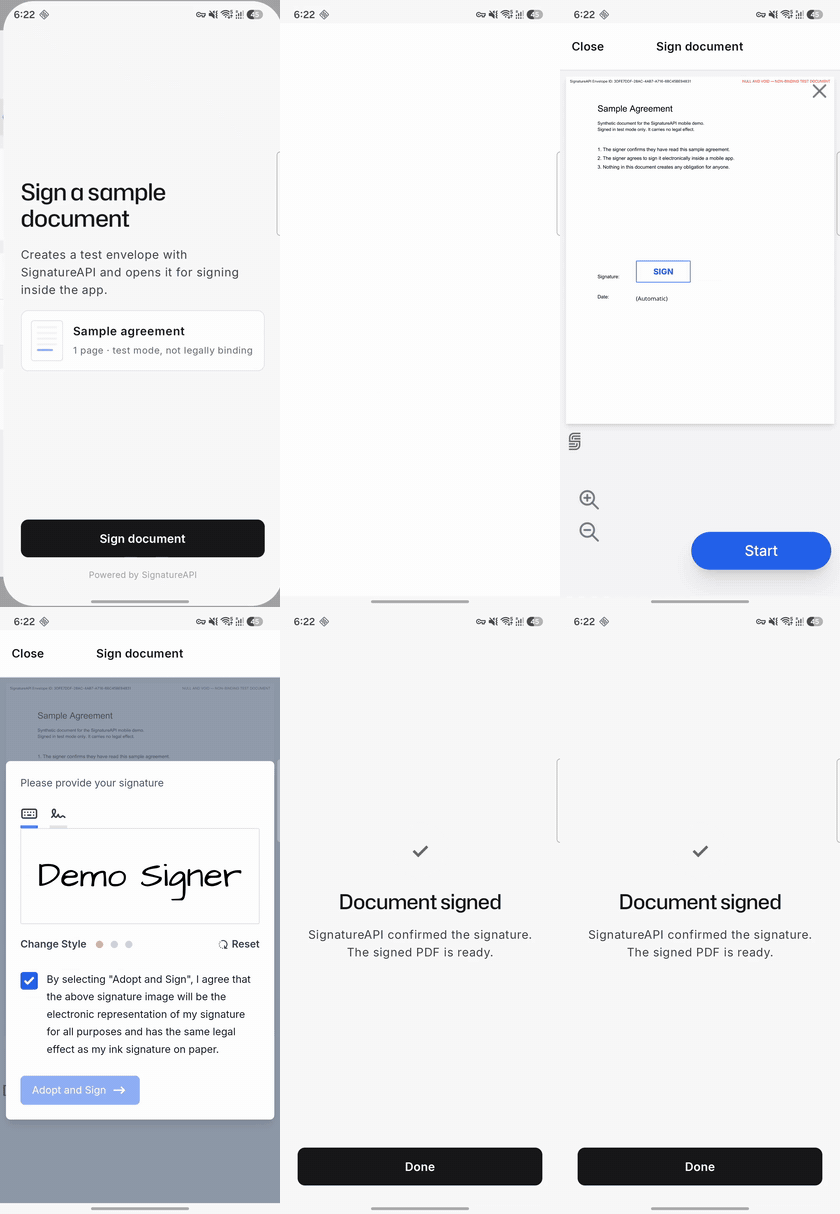
The samples need Android 8.0 (API level 26) or later, the demo’s minSdk.
How it works
sequenceDiagram
    participant App as Android app
    participant Server as Your server
    participant API as SignatureAPI
    participant View as WebView
    App->>Server: Ask for the signing link
    Server->>API: Create the envelope with custom authentication
    API-->>Server: Ceremony URL
    Server-->>App: Ceremony URL
    App->>View: Load the URL with embedded=true and event_delivery=redirect
    Note over View: The recipient signs
    View->>App: Navigate to signatureapi-message://ceremony.completed
    App->>View: Cancel the navigation and close
    App->>Server: Did the recipient sign?
    Server->>API: Read the envelope
    API-->>Server: Recipient status is completed
    Server-->>App: Confirmed, show the result screen
Your server creates the ceremony
Your server creates the envelope with custom authentication. SignatureAPI returns the ceremony URL to your server instead of emailing it. Your server passes the URL to the app.
The app loads the ceremony
The app appends embedded=true&event_delivery=redirect to the URL and loads it as the WebView's page.
The ceremony reports how it ended
When the ceremony ends, it navigates to a signatureapi-message:// URL. Your WebViewClient cancels that navigation and reads the event from the URL.
Your server confirms the outcome
The app asks your server whether the recipient really signed before it shows a result.
The ceremony is the WebView’s top-level page, so you don’t need embeddable_in or a host page. This page uses event_delivery=redirect, the recommended delivery, which needs no JavaScript bridge either. To receive the event as a JavaScript message instead, see Use message delivery instead.
Create the ceremony on your server
Create the envelope on your server and give the signer a ceremony with custom authentication:
// POST https://api.signatureapi.com/v1/envelopes
// X-API-Key: key_test_...
// Content-Type: application/json

{
  "title": "Sample agreement",
  "documents": [ /* ... */ ],
  "recipients": [
    {
      "type": "signer",
      "key": "signer",
      "name": "Jane Doe",
      "email": "jane.doe@example.com",
      "delivery_type": "none",
      "ceremony": {
        "authentication": [
          {
            "type": "custom",
            "provider": "YourApp",
            "data": {
              "Session ID": "a4f9e8b2-7c1d-4b2d-9a4b-e0c5d6f7a1b3",
              "Authenticated At": "2025-12-31T23:59:59Z"
            }
          }
        ],
        "redirect_delay": 0
      }
    }
  ]
}customauthentication makes SignatureAPI return the ceremony URL instead of emailing it. Put references to your own login session indata; they appear in the audit log.delivery_type: "none"stops SignatureAPI from emailing the signed deliverable to the signer. Set it toemailif you want them to get a copy.redirect_delay: 0is optional. It hands control back to the app as soon as the signer finishes, so the app can show its own result screen. Without it, the ceremony shows its own result page for 3 seconds.- Leave out
redirect_url. Embedded ceremonies ignore it. - Leave out
embeddable_in. A top-levelWebViewdoesn’t need it.
When the envelope leaves the processing status, read it and return the signer’s ceremony.url to the app:
// GET https://api.signatureapi.com/v1/envelopes/{envelope_id}
// X-API-Key: key_test_...

// HTTP/1.1 200 OK
{
  "id": "abcdef12-3456-7890-1234-abcdef123456",
  "status": "in_progress",
  "recipients": [
    {
      "type": "signer",
      "key": "signer",
      "ceremony": {
        "url": "https://sign.signatureapi.com/en/start?token=eyJhbGcNiIsInR..."
      }
    }
  ]
}The ceremony URL is a bearer credential: anyone holding it can sign. Don’t log it and don’t store it on the device. To resume later, ask your server for the current URL. Every read of the envelope returns a new URL for the same ceremony.
Load the ceremony
CeremonyLink turns the URL from your server into the URL the WebView loads. It adds embedded=true and event_delivery=redirect:
import android.net.Uri

/** Turns the ceremony URL from the server into the URL the WebView loads. */
object CeremonyLink {
    const val HOST = "sign.signatureapi.com"

    /**
     * `embedded=true` adapts the ceremony UI; `event_delivery=redirect` makes it
     * report its ending as a `signatureapi-message://` navigation.
     */
    fun embedded(ceremonyUrl: String): String {
        val uri = Uri.parse(ceremonyUrl)
        val builder = uri.buildUpon().clearQuery()
        uri.queryParameterNames
            .filter { it != "embedded" && it != "event_delivery" }
            .forEach { name -> uri.getQueryParameters(name).forEach { builder.appendQueryParameter(name, it) } }
        return builder
            .appendQueryParameter("embedded", "true")
            .appendQueryParameter("event_delivery", "redirect")
            .build()
            .toString()
    }
}
CeremonyWebView wraps a WebView for Jetpack Compose. It loads the ceremony as the page and passes each event to onEvent:
import android.annotation.SuppressLint
import android.content.ActivityNotFoundException
import android.content.Intent
import android.webkit.WebResourceRequest
import android.webkit.WebView
import android.webkit.WebViewClient
import androidx.compose.runtime.Composable
import androidx.compose.runtime.getValue
import androidx.compose.runtime.rememberUpdatedState
import androidx.compose.ui.Modifier
import androidx.compose.ui.viewinterop.AndroidView

/** Shows a SignatureAPI ceremony as the WebView's page and reports how it ended. */
@SuppressLint("SetJavaScriptEnabled")
@Composable
fun CeremonyWebView(
    ceremonyUrl: String,
    onEvent: (CeremonyEvent) -> Unit,
    modifier: Modifier = Modifier,
) {
    val currentOnEvent by rememberUpdatedState(onEvent)
    AndroidView(
        modifier = modifier,
        factory = { context ->
            WebView(context).apply {
                settings.javaScriptEnabled = true // The ceremony is a JavaScript app.
                webViewClient = CeremonyWebViewClient { currentOnEvent(it) }
                loadUrl(CeremonyLink.embedded(ceremonyUrl))
            }
        },
        onRelease = { it.destroy() },
    )
}

private class CeremonyWebViewClient(private val onEvent: (CeremonyEvent) -> Unit) : WebViewClient() {
    private var ended = false

    override fun shouldOverrideUrlLoading(view: WebView, request: WebResourceRequest): Boolean {
        val uri = request.url
        CeremonyEvent.from(uri)?.let { event ->
            end(event)
            return true
        }
        // Links a person taps that leave the ceremony, such as "Powered by
        // SignatureAPI", open in the browser instead of replacing the ceremony.
        if (request.isForMainFrame && request.hasGesture() && uri.host != CeremonyLink.HOST) {
            try {
                view.context.startActivity(Intent(Intent.ACTION_VIEW, uri))
            } catch (_: ActivityNotFoundException) {
                // No browser installed: stay on the ceremony.
            }
            return true
        }
        return false
    }

    private fun end(event: CeremonyEvent) {
        if (ended) return
        ended = true
        onEvent(event)
    }
}
Show it full screen under a bar your app owns:
import androidx.activity.compose.BackHandler
import androidx.compose.foundation.layout.Column
import androidx.compose.foundation.layout.fillMaxSize
import androidx.compose.foundation.layout.imePadding
import androidx.compose.material3.CenterAlignedTopAppBar
import androidx.compose.material3.ExperimentalMaterial3Api
import androidx.compose.material3.Text
import androidx.compose.material3.TextButton
import androidx.compose.runtime.Composable
import androidx.compose.ui.Modifier

@OptIn(ExperimentalMaterial3Api::class)
@Composable
fun CeremonyScreen(ceremonyUrl: String, onEvent: (CeremonyEvent) -> Unit, onClose: () -> Unit) {
    BackHandler(onBack = onClose)
    Column(Modifier.fillMaxSize()) {
        CenterAlignedTopAppBar(
            title = { Text("Sign document") },
            navigationIcon = { TextButton(onClick = onClose) { Text("Close") } },
        )
        CeremonyWebView(
            ceremonyUrl = ceremonyUrl,
            onEvent = onEvent,
            modifier = Modifier.fillMaxSize().imePadding(),
        )
    }
}
To hide the ceremony’s own Cancel controls, for example because your app has its own Close button, also append allow_cancel=false. See Disable Cancel.
Receive the result
With event_delivery=redirect, the ceremony ends by navigating to a signatureapi-message:// URL:
- The URL’s host is the event type, such as
ceremony.completed. - On
ceremony.failed, the query carrieserror_typeanderror_message, form-encoded (+is a space).
signatureapi-message://ceremony.failed/?error_type=unauthorized&error_message=The+link+is+no+longer+valid.This is a client-side navigation, not an HTTP redirect. No request reaches the network, so HTTP-layer interception such as shouldInterceptRequest or a proxy never sees it. Catch it in WebViewClient.shouldOverrideUrlLoading, as CeremonyWebViewClient does, and return true to cancel it.
CeremonyEvent parses the URL:
import android.net.Uri

/**
 * A terminal event from an embedded ceremony.
 *
 * With `event_delivery=redirect` the ceremony reports how it ended by navigating
 * to `signatureapi-message://<type>/?error_type=…&error_message=…`.
 * Branch on [type] and [errorType] only: [errorMessage] is for logs.
 */
data class CeremonyEvent(
    val type: String,
    val errorType: String? = null,
    val errorMessage: String? = null,
) {
    companion object {
        const val SCHEME = "signatureapi-message"

        /** Returns the event a `signatureapi-message://` URL describes, or null for any other URL. */
        fun from(uri: Uri): CeremonyEvent? {
            if (uri.scheme != SCHEME) return null
            val type = uri.host?.takeIf { it.isNotEmpty() } ?: return null
            // getQueryParameter decodes form encoding, including "+" as a space.
            return CeremonyEvent(type, uri.getQueryParameter("error_type"), uri.getQueryParameter("error_message"))
        }
    }
}
See Event types for every event and Event delivery for the delivery modes.
Handle each outcome
Branch on the event type, and on error_type for failures. This excerpt comes from the demo’s SigningViewModel, the ViewModel behind its screens. phase decides what the app shows:
import androidx.lifecycle.ViewModel
import androidx.lifecycle.viewModelScope
import kotlinx.coroutines.CancellationException
import kotlinx.coroutines.delay
import kotlinx.coroutines.flow.MutableStateFlow
import kotlinx.coroutines.flow.StateFlow
import kotlinx.coroutines.flow.asStateFlow
import kotlinx.coroutines.launch

class SigningViewModel(private val client: DemoServerClient) : ViewModel() {

    sealed interface Phase {
        data class Ready(val error: String? = null) : Phase
        data object Preparing : Phase
        data class Signing(val envelopeId: String, val ceremonyUrl: String) : Phase
        data object Confirming : Phase
        data class Finished(val ending: Ending) : Phase
    }

    sealed interface Ending {
        data object Signed : Ending
        data object Canceled : Ending
        data object Declined : Ending
        data class CouldNotOpen(val reason: String) : Ending
        data class NotConfirmed(val reason: String) : Ending
    }

    private val _phase = MutableStateFlow<Phase>(Phase.Ready())
    val phase: StateFlow<Phase> = _phase.asStateFlow()

    // ...

    fun onCeremonyEvent(event: CeremonyEvent) {
        val signing = _phase.value as? Phase.Signing ?: return
        when (event.type) {
            "ceremony.completed" -> {
                _phase.value = Phase.Confirming
                viewModelScope.launch { _phase.value = Phase.Finished(confirmSignature(signing.envelopeId)) }
            }
            "ceremony.canceled" -> _phase.value = Phase.Finished(Ending.Canceled)
            "ceremony.declined" -> _phase.value = Phase.Finished(Ending.Declined)
            else -> _phase.value = Phase.Finished(Ending.CouldNotOpen(explanation(event)))
        }
    }

    /**
     * `ceremony.completed` is a UI signal. The envelope on the server is the
     * proof, and its status can take a moment to catch up.
     */
    private suspend fun confirmSignature(envelopeId: String): Ending {
        try {
            repeat(12) {
                if (client.envelope(envelopeId).signerCompleted) return Ending.Signed
                delay(1_500)
            }
        } catch (e: CancellationException) {
            throw e
        } catch (e: Exception) {
            return Ending.NotConfirmed(e.message ?: "Couldn’t check the signature with the server.")
        }
        return Ending.NotConfirmed("SignatureAPI hasn’t confirmed the signature yet. It usually takes a few seconds.")
    }

    private fun explanation(event: CeremonyEvent): String = when (event.errorType) {
        "unauthorized" -> "This signing link is no longer valid. Start again to get a new one."
        "already_completed" -> "You already finished this document."
        "not_available" -> "This document is no longer available for signing."
        else -> "The signing session couldn’t be completed. Start again to get a new link."
    }
}
DemoServerClient is the demo’s client for your server, never for SignatureAPI. client.envelope(id) calls your server, which reads the envelope from SignatureAPI (GET /v1/envelopes/{id}). signerCompleted is true when the signer’s status is completed.
ceremony.completed: the signer finished. Treat it as a UI signal, not proof. Ask your server to read the envelope or recipient before you show “Signed” or act on it. See Confirm the outcome on your server.ceremony.canceled: the signer tapped Cancel. The envelope stays open, and your server can return a URL to resume later.ceremony.declined: an approver tapped Reject.ceremony.failed: the ceremony couldn’t be used. Branch onerror_typeand treat an unknown value as a generic failure. The ceremony already shows the signer a translated message.error_messageis a fixed English description for your logs: don’t show it to signers and don’t branch on it. See Error types.- Your own Close button or the back gesture: the ceremony sends no event. Treat it as canceled in the app.
Use message delivery instead
event_delivery=redirect is the recommended delivery. If you’d rather receive the event as a JavaScript message, keep loading the ceremony as the WebView’s page and use event_delivery=message instead. The ceremony is still the top-level page, so you still don’t need embeddable_in.
When the ceremony ends, it calls parent.postMessage(payload, "*"). As the top-level page, parent is the page’s own window, so the page receives its own message: { "type": "ceremony.completed" }, plus error_type and error_message on failure. A script that runs at document start forwards it to Kotlin.
The bridge script
This script is the security check. It forwards a message only when it comes from the ceremony’s origin and from this very window. Other messages go out as "kind": "rejected", which the app ignores. Copy it unchanged:
(function () {
  var CEREMONY_ORIGIN = "https://sign.signatureapi.com";

  function bridge() {
    var handlers = window.webkit && window.webkit.messageHandlers;
    return (handlers && handlers.signatureapiBridge) || window.signatureapiBridge;
  }

  window.addEventListener("message", function (event) {
    var target = bridge();
    if (!target) return;
    if (event.origin !== CEREMONY_ORIGIN || event.source !== window) {
      target.postMessage(JSON.stringify({ kind: "rejected", payload: { origin: event.origin } }));
      return;
    }
    target.postMessage(JSON.stringify({ kind: "event", payload: event.data }));
  });
})();
It posts a JSON string, { "kind": "event", "payload": … }, to the JavaScript object named signatureapiBridge. The demo’s iOS app embeds the same script.
Install it in the WebView
The listener and the script come from androidx.webkit. Parsing the forwarded JSON uses kotlinx.serialization. The demo’s version catalog:
[versions]
serialization = "1.7.3"
webkit = "1.12.1"

[libraries]
kotlinx-serialization-json = { group = "org.jetbrains.kotlinx", name = "kotlinx-serialization-json", version.ref = "serialization" }
androidx-webkit = { group = "androidx.webkit", name = "webkit", version.ref = "webkit" }

[plugins]
kotlin-serialization = { id = "org.jetbrains.kotlin.plugin.serialization", version.ref = "kotlin" }
Apply alias(libs.plugins.kotlin.serialization) in the app module’s plugins block, and add implementation(libs.androidx.webkit) and implementation(libs.kotlinx.serialization.json) to its dependencies.
CeremonyEventDelivery names the two modes, and CeremonyLink.embedded takes one instead of always appending redirect:
import android.net.Uri

/** How the ceremony reports its ending to the app: the `event_delivery` parameter. */
enum class CeremonyEventDelivery(val parameter: String) {
    Redirect("redirect"),
    Message("message"),
}

object CeremonyLink {
    const val HOST = "sign.signatureapi.com"
    const val ORIGIN = "https://$HOST"

    fun embedded(ceremonyUrl: String, delivery: CeremonyEventDelivery = CeremonyEventDelivery.Redirect): String {
        val uri = Uri.parse(ceremonyUrl)
        val builder = uri.buildUpon().clearQuery()
        uri.queryParameterNames
            .filter { it != "embedded" && it != "event_delivery" }
            .forEach { name -> uri.getQueryParameters(name).forEach { builder.appendQueryParameter(name, it) } }
        return builder
            .appendQueryParameter("embedded", "true")
            .appendQueryParameter("event_delivery", delivery.parameter)
            .build()
            .toString()
    }
}
This excerpt shows what message delivery adds to CeremonyWebView. CeremonyWebViewClient stays as in Load the ceremony, except that end is no longer private: the message listener calls it too.
import android.annotation.SuppressLint
import android.net.Uri
import android.util.Log
import android.webkit.WebView
import androidx.compose.runtime.Composable
import androidx.compose.runtime.getValue
import androidx.compose.runtime.rememberUpdatedState
import androidx.compose.ui.Modifier
import androidx.compose.ui.viewinterop.AndroidView
import androidx.webkit.WebViewCompat
import androidx.webkit.WebViewFeature

// Excerpt: the parts of CeremonyWebView that event_delivery=message adds.
@SuppressLint("SetJavaScriptEnabled")
@Composable
fun CeremonyWebView(
    ceremonyUrl: String,
    onEvent: (CeremonyEvent) -> Unit,
    modifier: Modifier = Modifier,
    eventDelivery: CeremonyEventDelivery = CeremonyEventDelivery.Redirect,
) {
    val currentOnEvent by rememberUpdatedState(onEvent)
    AndroidView(
        modifier = modifier,
        factory = { context ->
            WebView(context).apply {
                settings.javaScriptEnabled = true // The ceremony is a JavaScript app.
                val client = CeremonyWebViewClient { currentOnEvent(it) }
                webViewClient = client
                val delivery = when (eventDelivery) {
                    CeremonyEventDelivery.Message ->
                        if (installMessageBridge(this, client::end)) {
                            eventDelivery
                        } else {
                            Log.w(TAG, "This WebView lacks WEB_MESSAGE_LISTENER or DOCUMENT_START_SCRIPT; using redirect")
                            CeremonyEventDelivery.Redirect
                        }
                    CeremonyEventDelivery.Redirect -> eventDelivery
                }
                loadUrl(CeremonyLink.embedded(ceremonyUrl, delivery))
            }
        },
        onRelease = { it.destroy() },
    )
}

private const val TAG = "CeremonyWebView"

/** The `window` object the bridge script posts to. */
private const val BRIDGE_OBJECT = "signatureapiBridge"

/** The bridge script, byte for byte. */
private val MESSAGE_BRIDGE_SCRIPT = """
    (function () {
      var CEREMONY_ORIGIN = "https://sign.signatureapi.com";

      function bridge() {
        var handlers = window.webkit && window.webkit.messageHandlers;
        return (handlers && handlers.signatureapiBridge) || window.signatureapiBridge;
      }

      window.addEventListener("message", function (event) {
        var target = bridge();
        if (!target) return;
        if (event.origin !== CEREMONY_ORIGIN || event.source !== window) {
          target.postMessage(JSON.stringify({ kind: "rejected", payload: { origin: event.origin } }));
          return;
        }
        target.postMessage(JSON.stringify({ kind: "event", payload: event.data }));
      });
    })();
""".trimIndent()

/**
 * Installs the listener and the document-start script for `event_delivery=message`.
 * Returns false, installing nothing, when this WebView lacks either feature.
 */
private fun installMessageBridge(webView: WebView, onEvent: (CeremonyEvent) -> Unit): Boolean {
    // Two separate guards: lint's RequiresFeature check doesn't see through `||`.
    if (!WebViewFeature.isFeatureSupported(WebViewFeature.WEB_MESSAGE_LISTENER)) return false
    if (!WebViewFeature.isFeatureSupported(WebViewFeature.DOCUMENT_START_SCRIPT)) return false
    val allowedOrigins = setOf(CeremonyLink.ORIGIN)
    // The listener first: the script can then rely on window.signatureapiBridge.
    // Both are injected into every frame on the ceremony's origin, so only the
    // main frame's messages count. The listener is called on the UI thread.
    WebViewCompat.addWebMessageListener(webView, BRIDGE_OBJECT, allowedOrigins) { _, message, sourceOrigin, isMainFrame, _ ->
        if (!isMainFrame || !sourceOrigin.isCeremonyOrigin()) return@addWebMessageListener
        val event = message.data?.let(CeremonyEvent::fromBridgeMessage) ?: return@addWebMessageListener
        onEvent(event)
    }
    WebViewCompat.addDocumentStartJavaScript(webView, MESSAGE_BRIDGE_SCRIPT, allowedOrigins)
    return true
}

private fun Uri.isCeremonyOrigin() = scheme == "https" && host == CeremonyLink.HOST && port == -1- Check the features. Both APIs depend on the installed WebView version. When
WEB_MESSAGE_LISTENERorDOCUMENT_START_SCRIPTis missing,installMessageBridgeinstalls nothing and the app loads the ceremony withredirect. - Before
loadUrl. Add the listener and the script before the WebView loads the ceremony, so the script runs at the start of the ceremony’s document. - Only the ceremony’s origin. Both take
https://sign.signatureapi.comas the only allowed origin, so no other page gets thesignatureapiBridgeobject. - Check the sender again. Every frame on that origin gets the listener, so it accepts only messages where
isMainFrameis true andsourceOriginis the ceremony’s origin.
Parse the forwarded message
The bridge message carries the same type, error_type and error_message as the redirect URL. Add fromBridgeMessage to CeremonyEvent, so SigningViewModel handles both deliveries with the same code:
import android.net.Uri
import kotlinx.serialization.SerialName
import kotlinx.serialization.Serializable
import kotlinx.serialization.json.Json

// Excerpt: the members of CeremonyEvent that parse a bridge message.
data class CeremonyEvent(
    val type: String,
    val errorType: String? = null,
    val errorMessage: String? = null,
) {
    companion object {
        /** The events the ceremony emits. */
        val TERMINAL_TYPES = setOf("ceremony.completed", "ceremony.canceled", "ceremony.declined", "ceremony.failed")

        private val json = Json { ignoreUnknownKeys = true }

        // ... SCHEME and from(uri) as in Receive the result ...

        /**
         * Parses what the top-level message bridge posts:
         * `{"kind":"event","payload":{"type":…,"error_type":…,"error_message":…}}`.
         *
         * Returns null for `"kind":"rejected"` (a message that failed the origin or
         * source check) and for any payload that is not a ceremony event: a
         * top-level page can also receive unrelated messages from itself.
         */
        fun fromBridgeMessage(message: String): CeremonyEvent? {
            val parsed = try {
                json.decodeFromString<BridgeMessage>(message)
            } catch (_: IllegalArgumentException) {
                // Includes SerializationException: not JSON, or a payload without a type.
                return null
            }
            val payload = parsed.payload.takeIf { parsed.kind == "event" && it.type in TERMINAL_TYPES } ?: return null
            return CeremonyEvent(payload.type, payload.errorType, payload.errorMessage)
        }
    }

    @Serializable
    private data class BridgeMessage(val kind: String, val payload: Payload) {
        @Serializable
        data class Payload(
            val type: String,
            @SerialName("error_type") val errorType: String? = null,
            @SerialName("error_message") val errorMessage: String? = null,
        )
    }
}
Accept only the ceremony’s event types. The page can also receive unrelated messages from itself, and those pass the origin and source check.
With message, the ceremony doesn’t navigate to signatureapi-message://. Keeping the redirect interception in shouldOverrideUrlLoading is harmless, and it also serves the fallback to redirect.
Configure the WebView
Only JavaScript needs to be on. The ceremony uses no cookies, localStorage, sessionStorage or IndexedDB, so DOM storage and third-party cookies can stay off, which are the WebView defaults.
- Hosts. The WebView contacts
sign.signatureapi.com,api.signatureapi.com,vault.signatureapi.com,fonts.googleapis.comandfonts.gstatic.com. Allow them if your app restricts network access. See Browser requirements. - Rotation. Declare
configChangesfor orientation and screen size so rotation doesn’t recreate the activity. Otherwise the WebView reloads and the signer loses their progress. - Keyboard. Set
windowSoftInputMode="adjustResize"and addimePadding()to the WebView, so fields stay visible while the signer types. - Links that leave the ceremony. A tapped link to another host opens in the browser, so the ceremony stays in place.
- Renderer process termination. Android can end the WebView’s renderer process, for example to reclaim memory. The default
WebViewClient.onRenderProcessGonereturnsfalse, which crashes your app. Override it, returntrue, and discard the deadWebView: it can’t load anything again. Then let the signer reopen the ceremony, with the current URL from your server.
<uses-permission android:name="android.permission.INTERNET" />

<application>
    <!-- configChanges: rotation and keyboard changes must not recreate the
         activity, or the WebView reloads and the signer loses their progress. -->
    <activity
        android:name=".MainActivity"
        android:configChanges="orientation|screenSize|screenLayout|smallestScreenSize|keyboard|keyboardHidden|density"
        android:exported="true"
        android:windowSoftInputMode="adjustResize">
        <!-- ... -->
    </activity>
</application>
Load it in an iframe instead
If your web SDK already embeds the ceremony in an <iframe>, the same page can run inside a WebView. Use this path only to share that host page with your web app. You don’t need it to receive events as messages: message delivery works with the ceremony as the top-level page. The top-level pattern above is simpler: no host page and no embeddable_in.
- Load your host page with
WebView.loadDataWithBaseURLand a synthetic https base URL, such ashttps://app.example.invalid. Nothing is fetched from it. - List that origin in the ceremony’s
embeddable_inwhen you create it. The ceremony builds its CSPframe-ancestorsdirective from it. - Use
event_delivery=messagein the iframe URL, and escape&as&in thesrcattribute.
The host page accepts a message only when it comes from the ceremony’s origin and from this iframe’s window:
<!doctype html>
<html lang="en">
<head>
<meta charset="utf-8">
<meta name="viewport" content="width=device-width, initial-scale=1, viewport-fit=cover">
<title>Signing ceremony</title>
<style>
html, body { margin: 0; height: 100%; background: #ffffff; }
iframe { display: block; width: 100%; height: 100%; border: 0; }
</style>
</head>
<body>
<iframe id="ceremony" title="Signing ceremony" src="https://sign.signatureapi.com/en/start?token=eyJhbGcNiIsInR...&embedded=true&event_delivery=message"></iframe>
<script>
(function () {
var CEREMONY_ORIGIN = "https://sign.signatureapi.com";
var frame = document.getElementById("ceremony");
window.addEventListener("message", function (event) {
if (event.origin !== CEREMONY_ORIGIN || event.source !== frame.contentWindow) return;
// Forward event.data to native code.
});
})();
</script>
</body>
</html>The ceremony posts with target origin "*" and its payload carries no secrets, so the origin and source check is yours to make. Forward accepted messages to Kotlin through a JavaScript object you register with WebViewCompat.addWebMessageListener, restricted to your synthetic origin.
Test the integration
To stop email link scanners from completing ceremonies, the ceremony arms completion only after input a person produces. UiAutomator gestures count. Espresso-Web webClick() does not: it dispatches the click from JavaScript. If a test reaches Finish without real input, the ceremony opens a “Confirm to continue” dialog. Don’t confirm it in tests: it means the test is not acting like a signer. See Automated testing.
Before the test clicks through the ceremony, swipe the document with a real finger gesture, as a signer does:
/** A real finger swipe through the ceremony, sent through the system input pipeline. */
private fun scrollDocumentLikeASigner() {
    val device = UiDevice.getInstance(InstrumentationRegistry.getInstrumentation())
    val webView = device.wait(Until.findObject(By.clazz("android.webkit.WebView")), 30_000)
        ?: throw AssertionError("The ceremony WebView is not on screen")
    val bounds = webView.visibleBounds
    val x = bounds.centerX()
    device.swipe(x, bounds.centerY() + bounds.height() / 4, x, bounds.centerY() - bounds.height() / 4, 25)
    device.swipe(x, bounds.centerY() - bounds.height() / 4, x, bounds.centerY() + bounds.height() / 4, 25)
    SystemClock.sleep(300)
}
Then assert on what the app shows after it receives the event:
private fun waitForText(text: String, timeoutMs: Long) {
    compose.waitUntil(timeoutMillis = timeoutMs) {
        compose.onAllNodesWithText(text).fetchSemanticsNodes().isNotEmpty()
    }
}

// After the test taps Finish:
waitForText("Document signed", timeoutMs = 60_000)
The app shows “Document signed” only after it intercepts ceremony.completed and your server confirms the signature. Never assert on the ceremony’s console output.
Also test the failures:
unauthorized: create a new ceremony for the recipient, then open the earlier URL.already_completed: open the URL again after the signer finished.
Complete example
Mobile integration demo
A runnable server, iOS app and Android app, with UI tests that sign a real test-mode ceremony.