When someone creates a SignatureAPI account, the first thing we want them to do is send a request to the API. Reading the docs and looking around the dashboard are useful, but the integration only starts to exist once a request goes out and an envelope comes back. We track this as the share of new accounts that make their first API call within 48 hours of signing up, and the share of those first calls that fail.
At the start of October, fewer than half of new accounts made that first call, and some of the ones that did got an error back. We set ourselves a goal for one week of work: raise the call rate to at least 50% and bring first-call errors under 20%. The goal was to ship the changes that week, knowing the numbers could only be read once a new cohort of signups had its 48 hours.
What we shipped is a guided first envelope that new accounts see before anything else in the dashboard. A week of signups has now gone through it, and the numbers did not move. This post explains what we built and why, and what the first week shows, including the parts that did not work.
The first-run screen we had
Before this change, a new account landed on an empty Activity page with two cards side by side. “Let an agent do it” offered a prompt to paste into a coding agent, and “Do it yourself” linked to the API quickstart and to the playground, where a test envelope can be sent from a form. Above both cards sat the account’s test API key, ready to copy. The page told the user that everything there runs in test mode, so no emails go out, documents are watermarked, and nothing is billed.
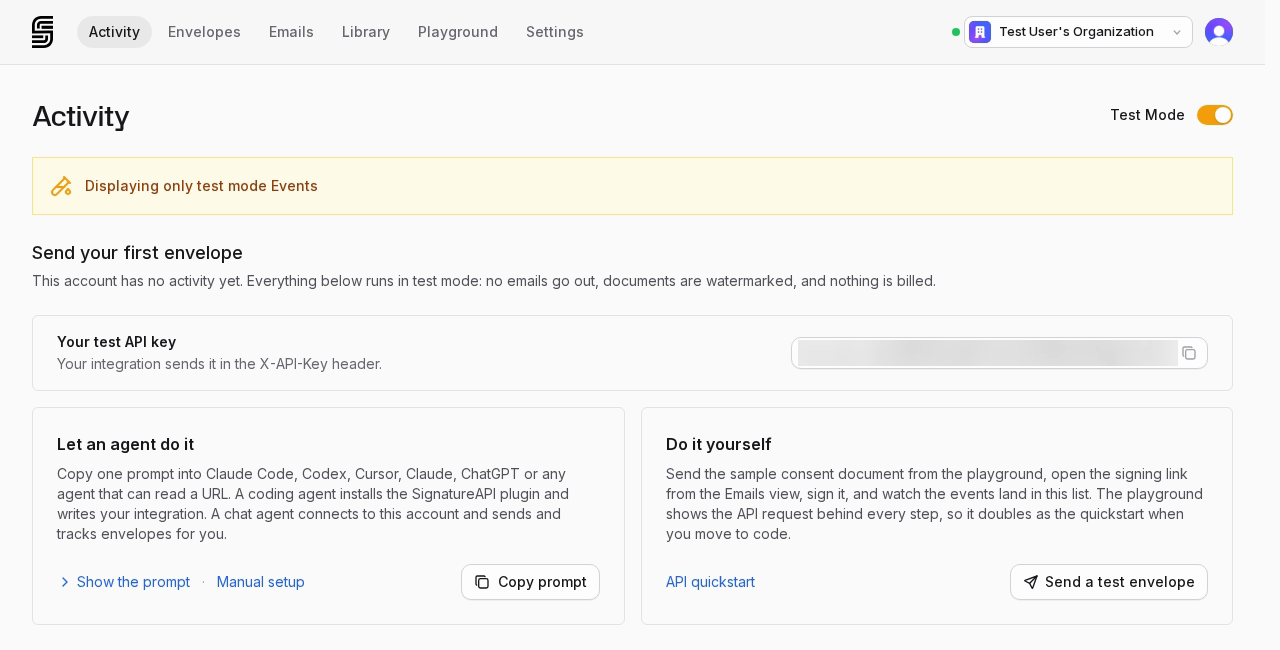
Every action on that screen took the user somewhere else. Both paths led to an agent, the docs or the playground before the user had seen what an envelope is or what a request produces, and the first request was left for them to write or configure.
One click and a transition
The first design we built kept that screen and put a welcome dialog in front of it. The dialog had one button, “Create your first envelope”. Clicking it sent a real request to the API with the account’s test key, played a six-second full-screen animation of that request while the envelope was being created, and then sent the user to the signing ceremony in the same tab. After signing, they came back to a page that waited for the signed document.
This version worked, and it would have produced a first API call for every account that clicked the button. We replaced it before it reached customers. The request was the thing we most wanted people to see, and in this design it was on screen for a few seconds inside an animation, with no way to stop and read it. Signing also happened on a separate page, so the user left the dashboard to sign, and returned to a page that only said whether the document was ready. It never showed what the API returns once an envelope is signed.
What we shipped
The design that shipped turns the same request into a short sequence of stages that the user moves through at their own pace. Accounts with no envelopes, whose user is allowed to create envelopes and manage API keys, are sent to it from the Activity page. Every stage after the welcome has a Skip link, and skipping before the envelope exists returns to the two-card screen described above.
| Stage | What the user sees |
|---|---|
| Welcome | “Welcome, {first name}”, the three steps, Start and “Skip for now” |
| Request | The full request body, typed in line by line, then paused with five tips |
| Creating | An animation of the request turning into a document, while the envelope is created |
| Signing | The signing ceremony, embedded in the dashboard |
| Completion | The signed document next to the data an app would receive |
| Final screen | Download of the signed document, the test API key, and where to go next |
The request
The request stage shows the exact body that the dashboard sends to the API, built by the same code that sends it. Only the API key is masked. The user is the signer, with the name and email from their account, and the document is a Word template that the request fills in with that name and email. Five blue dots mark the parts of the request worth explaining. One of them says “Each {{name}} and {{email}} in the template is replaced with its value here”, and another explains that with custom authentication “your app delivers the signing link itself, so SignatureAPI doesn’t email the signer”.
The template also has two optional questions, “Where did you hear about us?” as a dropdown and “Team size” as a radio group. They are folded away in the request under ”+ 2 optional questions”, and they exist to show that a document can collect answers, not only signatures. The request is sent when the user clicks “Send request”, whether or not they have opened any of the tips.
Signing inside the dashboard
The ceremony opens inside the dashboard, labelled “embedded in your app with embeddable_in”. This is the same embedding a customer would use to show signing inside their own product, so the first envelope a new user signs is also a working example of that feature. When the ceremony reports that it completed, the dashboard moves on by itself.
Building this exposed a bug in the API that affected every customer using radio groups. When a signer left an optional radio group unanswered, the ceremony could not be completed. Optional radio groups can now be left empty, and required ones are still enforced. We also found that dropdown answers were missing from the envelope data the dashboard reads, and fixed it so the dashboard and the public API return answers the same way.
Completion and the final screen
The completion stage puts the signed document on the left, with the user’s answers printed in it, and “What your app receives” on the right. One card shows the shape of the webhook event sent when an envelope completes, with the real envelope id, and notes that it doesn’t include the answers. The other shows the envelope as the API returns it, with the user’s real answers under the keys the request gave them. After a few seconds the page continues to the final screen, and it waits if the user is reading the cards.
The final screen offers “Download signed document”, which includes the audit log, and “View envelope”. Below that are the test API key and two next steps, “Connect an agent” and “Keep testing in the playground”.
What the first week shows
We compared accounts created in the two weeks before the release with accounts created in the week after it. We left out accounts opened by people who already had a SignatureAPI account, and accounts created by people who had first used SignatureAPI as a signer, since neither group goes through onboarding the way a new customer does. A first call is any request made with the account’s keys in the 48 hours after signup, including requests sent from the dashboard.
| Before | After | |
|---|---|---|
| Accounts that made a first API call | 47% | 45% |
| First calls that returned an error | 15% | 20% |

Neither number moved toward the goal. With a stricter rule for spotting people who already had an account, and with throwaway accounts left out, the call rate drops from 49% to 43% and errors rise from 11% to 22%. The cohorts are small, one week of signups after the release, so a difference of a few points is within what a couple of accounts can change. Even allowing for that, the data does not show the new flow raising the call rate.
Looking at individual first calls explains part of it. In the week after the release, most first calls were the guided envelope’s own request, and all of those succeeded. The few first calls that came from customers’ own code all failed. The guided request is sent with the account’s test key, so it counts as a first call, but the accounts that used it seem to be largely the same accounts that would have sent a request anyway, through the playground or the quickstart. It changed how those people made their first call without bringing in new ones. It also did nothing for the first request a developer writes in their own code, and all of the first-call errors in the new cohort came from those requests.
We also have to correct our starting point. The 39% call rate and 42% error rate the goal was set against came from an earlier measurement whose definition we could not reproduce. Measured the way described above, the starting point was 47% and 15%, so the goal was set against numbers that were already out of date.
What we don’t know yet
We have not measured how many new accounts finish the guided envelope, how many skip it, or at which stage people leave, and that is the first thing we will look at. We also don’t know whether people who sign their first envelope this way are more likely to send a second request from their own code a few days later, which is what the flow was meant to lead to and what a 48-hour window cannot show.
The errors on first requests from customers’ own code are the clearer problem. A recurring one is a validation error whose response says nothing beyond its name, which leaves the developer with nothing to fix. We plan to fix it first.
If you are writing your first request, the API quickstart walks through it step by step.